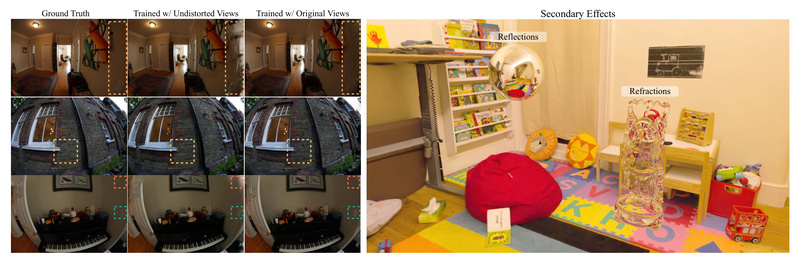
3D Gaussian Splatting (3DGS) revolutionized real-time 3D scene reconstruction by delivering photorealistic quality at high frame rates on consumer GPUs. But it came with two hard limits: it only worked with ideal pinhole cameras, and it couldn’t render secondary lighting effects like reflections or refractions. For anyone working with real-world cameras—whether on drones, smartphones, robots, or VR headsets—these limitations made 3DGS impractical in many everyday scenarios.
Enter 3DGUT (3D Gaussian Unscented Transform), a breakthrough extension that removes both constraints while preserving the blazing-fast rasterization pipeline that makes 3DGS so appealing. By replacing the traditional Elliptical Weighted Average (EWA) splatting formulation with the Unscented Transform, 3DGUT enables accurate projection of Gaussian particles under any nonlinear camera model—including fisheye lenses, rolling shutter distortions, and other time-varying effects. Even better, it maintains a rendering formulation compatible with ray-traced approaches, paving the way for hybrid rendering that blends speed and realism.
In short: 3DGUT gives you the performance of 3DGS with the flexibility of real-world imaging systems—no trade-offs required.
Why Standard 3DGS Falls Short in Practice
Traditional 3DGS assumes a perfect pinhole camera model. While convenient for synthetic datasets like NeRF Synthetic, this assumption breaks down with almost any physical camera. Mobile phone sensors, drone gimbals, automotive cameras, and AR/VR rigs commonly use wide-angle or rolling-shutter optics that introduce nonlinear distortions. Attempting to “pre-correct” these distortions before feeding data into 3DGS often leads to artifacts, misalignment, or loss of temporal fidelity.
Moreover, 3DGS renders only primary rays—meaning it can’t simulate reflections, refractions, shadows, or other effects requiring secondary ray interactions. This blocks its use in applications where material realism matters, such as virtual try-ons, industrial digital twins, or immersive entertainment.
3DGUT directly addresses both gaps—not by reinventing the wheel, but by rethinking how Gaussian particles are projected and rendered.
How 3DGUT Works: Rasterization Meets Real-World Optics
At its core, 3DGUT replaces the EWA splatting step with the Unscented Transform (UT), a technique from probabilistic filtering that approximates the projection of a Gaussian distribution through any nonlinear function. Instead of assuming a linear pinhole projection, UT samples a set of "sigma points" around each 3D Gaussian, projects them through the exact camera model (distorted or time-varying), and reconstructs the splat in screen space from those points.
This small but powerful change unlocks:
- Native support for distorted cameras: Fisheye, catadioptric, or rolling-shutter cameras can now be used directly—no undistortion needed.
- Time-dependent effects: Rolling shutter artifacts, which unfold line-by-line over time, are naturally handled by applying the camera projection per-row via UT.
- Rasterization efficiency retained: Unlike full ray tracing, 3DGUT runs entirely in the rasterization pipeline, delivering hundreds to over a thousand FPS on modern NVIDIA GPUs.
Crucially, the rendering formulation in 3DGUT is designed to align with 3DGRT (3D Gaussian Ray Tracing)—the project’s companion method that does trace rays through Gaussians. This compatibility enables a hybrid approach: render primary visibility with fast 3DGUT rasterization, then cast secondary rays (for reflections, refractions, shadows) only where needed using 3DGRT. The result is a best-of-both-worlds pipeline: speed for the bulk of the frame, plus physically plausible effects where they matter most.
Ideal Use Cases Where 3DGUT Shines
3DGUT isn’t just a theoretical upgrade—it solves real engineering problems:
- Drone or vehicle capture: Wide-angle lenses introduce heavy barrel distortion. 3DGUT processes raw images without preprocessing, preserving geometric integrity.
- Mobile AR/VR: Rolling shutter is ubiquitous in phone cameras. 3DGUT handles it natively, enabling stable reconstructions from handheld video.
- Industrial inspection: Non-pinhole sensors (e.g., stereo fisheye rigs) can now be used directly in Gaussian splatting workflows.
- Real-time reflections in simulation: By combining 3DGUT (primary view) with 3DGRT (secondary rays), developers can add mirror-like surfaces or transparent objects to digital twins in Omniverse or Isaac Sim—without switching to a slower NeRF-based renderer.
In contrast, vanilla 3DGS either fails outright or requires error-prone workarounds (like undistorting images, which can warp geometry or lose pixels). 3DGUT eliminates those compromises.
Getting Started: From Code to Real-Time Rendering
The 3DGUT codebase is designed for practical adoption. Here’s how to get up and running:
- Installation: The repo provides a Conda-based setup (
install_env.sh) and Docker support. On Linux, it auto-configures CUDA 11.8 (with optional GCC 11 for Ubuntu 24.04). Windows support is now available via PowerShell scripts. For RTX 5090 (Blackwell) GPUs, use the experimental CUDA 12.8.1 build. - Training: Pre-configured YAML files let you train on standard datasets—NeRF Synthetic, MipNeRF360, or ScanNet++—with a single command. Just specify
apps/nerf_synthetic_3dgut.yamlorapps/colmap_3dgut.yamland point to your data. - Advanced features: You can enable MCMC-based densification for better geometry, use image masks to ignore backgrounds, or switch to SparseAdam for memory efficiency.
- Deployment: Export trained models to USDZ format for direct use in NVIDIA Omniverse or Isaac Sim, enabling integration into robotics or simulation pipelines.
The interactive Playground GUI (playground.py) even lets you visualize reflections, depth of field, and inserted objects in real time—ideal for debugging or demos.
Performance: Speed That Doesn’t Compromise
Benchmark results on an RTX 5090 show 3DGUT delivers near-identical visual quality to 3DGRT—while running dramatically faster:
- NeRF Synthetic: 846 FPS average (vs. 347 FPS for 3DGRT), with PSNR of 33.88 (vs. 33.87).
- MipNeRF360: 317 FPS with MCMC (vs. 68 FPS for 3DGRT), PSNR of 27.78 (vs. 27.22).
This means you get distortion-aware reconstruction and a path to secondary effects—without giving up the real-time interactivity that makes Gaussian splatting compelling.
Limitations and Practical Considerations
3DGUT isn’t a magic bullet:
- Secondary effects require 3DGRT: Full reflections/refractions need the ray-traced 3DGRT module, which demands RTX hardware and runs slower. 3DGUT alone handles only primary visibility.
- Linux-first, Windows emerging: While Windows support was added in mid-2025, Linux remains the best-tested platform.
- Blackwell GPUs need special builds: RTX 5090 users must use CUDA 12.8.1 and the experimental installer.
- Multi-sensor data must follow COLMAP conventions: Complex rigs (e.g., multi-camera drones) need proper calibration and dataset formatting.
Still, for most real-world distorted-camera scenarios, 3DGUT alone is sufficient—and dramatically more robust than standard 3DGS.
When to Choose 3DGUT
Pick 3DGUT if you:
- Use non-pinhole or rolling-shutter cameras,
- Need real-time rendering (>300 FPS),
- Want a future-proof path to add reflections/refractions via hybrid rendering.
Avoid it only if:
- Your cameras are perfectly calibrated pinhole systems and you never need secondary lighting,
- You lack an NVIDIA GPU (required for both rasterization and optional ray tracing).
For everyone else—especially in robotics, mobile capture, or simulation—3DGUT removes critical barriers to deploying Gaussian splatting in the wild.
Summary
3DGUT extends 3D Gaussian Splatting to the real world: it supports distorted and time-varying cameras out of the box, maintains rasterization-level speed, and opens the door to physically based effects through hybrid rendering. With straightforward installation, compatibility with standard datasets, and export to industrial simulation tools, it’s a practical upgrade for any project that moves beyond synthetic benchmarks. If your work involves real cameras, real-time performance, and real lighting—3DGUT is the bridge between research and deployment.