Silent videos—whether from AI-generated content, archival footage, gameplay recordings, or unfinished film prototypes—often lack the immersive quality that sound brings. Manually adding realistic, well-timed sound effects is time-consuming and requires specialized audio expertise. Enter FoleyCrafter, an open-source framework that automatically generates high-quality, semantically relevant, and temporally synchronized sound effects directly from video input. Built on solid research and practical engineering, FoleyCrafter enables creators, developers, and researchers to “bring silent videos to life” without needing a sound studio or deep audio engineering knowledge.
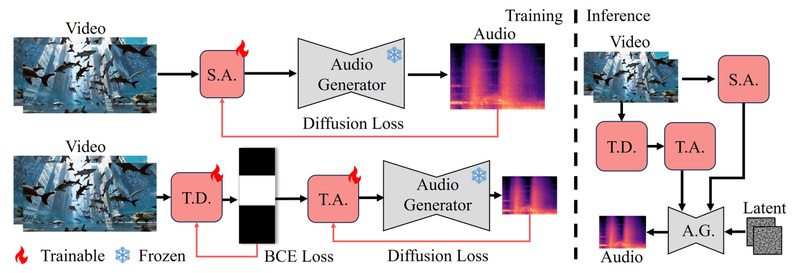
Developed by researchers at OpenMMLab, FoleyCrafter leverages a pre-trained text-to-audio foundation model (Auffusion) and extends it with novel components specifically designed for video-to-audio synthesis. The result? Audio that not only sounds realistic but also aligns precisely with on-screen actions—like footsteps matching stride timing or glass shattering exactly when it breaks.
Key Innovations Behind FoleyCrafter
FoleyCrafter isn’t just another audio generation tool. It solves two core challenges in neural foley: semantic relevance and temporal synchronization. Here’s how it achieves both.
Semantic Adapter for Content-Aware Sound
At the heart of FoleyCrafter is a semantic adapter—a lightweight module that injects visual understanding into the audio generation process. Using parallel cross-attention layers, it conditions the audio model on video features extracted from the input clip. This ensures the generated sounds (e.g., rain, typing, clinking dishes) are not only plausible but directly tied to what’s happening on screen.
Temporal Controller for Frame-Level Precision
Even if a sound is semantically correct, it’s unusable if it’s out of sync. FoleyCrafter introduces a temporal controller composed of two parts:
- An onset detector that identifies key moments of visual change (e.g., a hand slapping a table).
- A timestamp-based adapter that aligns audio events to these visual onsets.
This dual-component system ensures that sounds occur at the exact right moment, creating a natural, immersive experience.
Prompt-Guided Audio with Full Creative Control
One of FoleyCrafter’s most practical features is its compatibility with text prompts—both positive and negative. Want to emphasize crowd chatter in a street scene? Add the prompt: noisy, people talking. Need to suppress wind noise in a mountain clip? Use a negative prompt: wind noise. This level of control makes FoleyCrafter not just automatic, but controllable, enabling tailored audio generation aligned with creative intent.
Practical Use Cases
FoleyCrafter shines in real-world scenarios where audio is missing, poor, or needs rapid prototyping:
- Enhancing AI-Generated Videos: Pair with models like Sora or other video generators to add synchronized sound without manual editing.
- Game Development & Prototyping: Quickly add realistic sound effects to silent gameplay footage during early testing phases.
- Film & Animation Previs: Create audio-enriched storyboards or animatics to evaluate pacing and emotional impact.
- Archival & Historical Media: Restore immersive context to silent historical clips by generating period-appropriate ambient sounds.
- Accessibility Tools: Dynamically generate contextual audio cues for visually impaired users interacting with silent visual content.
Because it runs from the command line and includes a Gradio demo, it’s equally accessible to researchers running batch experiments and creators exploring ideas interactively.
Getting Started: From Installation to Inference
FoleyCrafter is designed for ease of use, even for those without deep learning infrastructure expertise.
Environment Setup
First, create a Conda environment using the provided YAML file:
conda env create -f requirements/environment.yaml
conda activate foleycrafter
Install Git LFS to handle large model files:
conda install git-lfs && git lfs install
Checkpoint Management
FoleyCrafter builds upon the Auffusion text-to-audio model. You’ll need to download both the base model and FoleyCrafter-specific weights:
git clone https://huggingface.co/auffusion/auffusion-full-no-adapter checkpoints/auffusion
git clone https://huggingface.co/ymzhang319/FoleyCrafter checkpoints/
Organize the files as specified in the repository structure—semantic adapter, vocoder, temporal adapter, and onset detector must all be in place.
Running Inference
Basic video-to-audio generation is as simple as:
python inference.py --save_dir=output/sora/
For temporal alignment (recommended for action-heavy scenes):
python inference.py --temporal_align --input=input/avsync --save_dir=output/avsync/
To use text prompts for guided generation:
python inference.py --input=input/PromptControl/case1/ --prompt='noisy, people talking' --save_dir=output/case1_prompt/
Or apply negative prompts to suppress unwanted sounds:
python inference.py --input=input/PromptControl/case3/ --nprompt='river flows' --save_dir=output/case3_nprompt/
For quick experimentation, launch the Gradio demo:
python app.py --share
This provides a browser-based interface to upload videos and generate audio interactively—ideal for non-technical collaborators or rapid iteration.
Important Limitations to Consider
While powerful, FoleyCrafter has current constraints that users should evaluate before integration:
- Training code is not yet released, limiting fine-tuning or adaptation to custom domains.
- Commercial use depends on Auffusion’s license, which must be reviewed separately.
- Performance varies with visual ambiguity: complex or low-motion scenes (e.g., static landscapes) may yield less accurate or generic audio.
- Manual checkpoint setup is required—no auto-download during first run, though the inference script can fetch models if paths are configured.
These limitations don’t diminish its utility but highlight the importance of matching the tool to the right stage of your project—especially for prototyping, research, or non-commercial creative work.
Summary
FoleyCrafter bridges a critical gap in multimodal content creation: the automatic, high-fidelity synthesis of synchronized sound for silent video. By combining semantic alignment, precise temporal control, and prompt-based guidance, it delivers a rare balance of quality, relevance, and usability. Whether you’re a filmmaker, game developer, AI researcher, or content creator, FoleyCrafter offers a compelling way to enrich visual media with lifelike audio—without the overhead of manual sound design. With open-source code, clear documentation, and support for both command-line and web-based interaction, it’s ready for real-world adoption today.