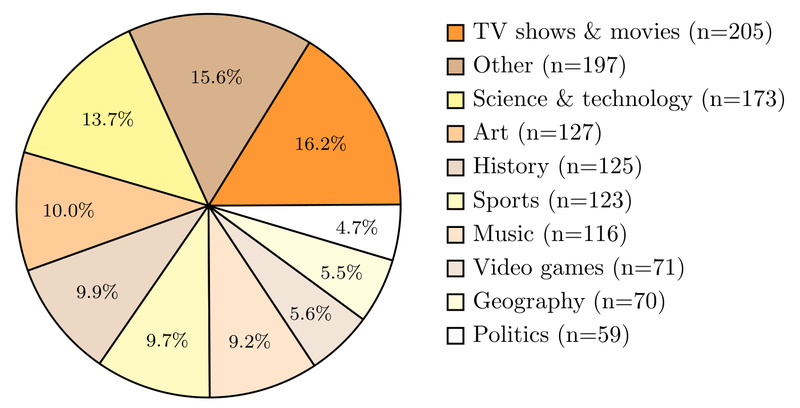
Evaluating whether an AI agent can truly browse the web—navigating across pages, persisting through dead ends, and extracting entangled facts—is harder than it sounds. Most benchmarks either oversimplify the task or bundle it with unrelated challenges like long-form generation or user intent disambiguation. BrowseComp cuts through this noise.
Developed by OpenAI and open-sourced as part of the simple-evals repository, BrowseComp is a lightweight yet demanding benchmark designed specifically to test an agent’s ability to find hard-to-locate information through sustained, creative web navigation. It consists of 1,266 short-answer questions where correctness is easy to verify, but the path to the answer often requires multiple hops, tool use, and intelligent decision-making—mirroring real-world browsing behavior without the ambiguity of open-ended tasks.
Think of BrowseComp as the “programming competition” of web browsing: incomplete as a full simulation of user behavior, but exceptionally useful for isolating and measuring a core skill—persistent, goal-directed information seeking.
Key Strengths of BrowseComp
1. Simplicity Without Sacrificing Difficulty
Each BrowseComp question has a short, factual answer (e.g., a number, name, or date), making automated scoring reliable and reproducible. Yet the questions are deliberately crafted to be non-trivial: answers are rarely on the first page of a Google search. Agents must follow links, cross-reference sources, and sometimes backtrack—testing real browsing competence, not just keyword matching.
2. Focused on Core Agent Capabilities
BrowseComp intentionally sidesteps challenges like resolving ambiguous queries or generating essays. Instead, it hones in on what matters most for browsing agents:
- Tool orchestration (e.g., using a browser emulator)
- Navigation persistence (continuing after dead ends)
- Information synthesis (combining facts from multiple pages)
This focus makes it ideal for iterative development and targeted improvement.
3. Open, Transparent, and Reproducible
The benchmark is part of the MIT-licensed simple-evals GitHub repo, which includes reference implementations for BrowseComp, SimpleQA, and HealthBench. This transparency allows researchers and engineers to run evaluations locally, compare models fairly, and even adapt the framework for internal testing.
4. Realistic Evaluation Protocol
BrowseComp uses zero-shot, chain-of-thought prompting—mirroring how modern instruction-tuned models are actually deployed. No few-shot tricks or role-playing prompts. This design reflects real-world usage more accurately than legacy evaluation styles built for base models.
Ideal Use Cases for BrowseComp
BrowseComp shines in specific, high-value scenarios:
- Benchmarking browsing agents: Compare versions of your agent during development to see if navigation logic improvements actually boost performance.
- Evaluating tool-use capabilities: Test whether an agent can effectively chain browser actions (search → click → scroll → extract) to solve complex information tasks.
- Model selection for web-augmented systems: Choose between foundation models (e.g., o1 vs. GPT-4.5) based on their demonstrated ability to persistently seek information.
- Academic research: Use BrowseComp as a standardized task to validate new algorithms for web navigation, planning, or retrieval-augmented reasoning.
If your project involves autonomous web interaction, BrowseComp provides a clear, quantifiable signal of progress.
Getting Started with BrowseComp
Using BrowseComp is straightforward:
-
Clone the repository:
git clone https://github.com/openai/simple-evals
-
Install dependencies: The repo uses minimal, modular dependencies. For example, install the OpenAI or Anthropic SDK depending on your model provider.
-
Run evaluations:
python -m simple-evals.simple_evals --model gpt-4o-2024-11-20 --examples 100
The system uses zero-shot CoT prompting by default and evaluates answers against ground-truth references using exact match or simple normalization.
-
Interpret results: BrowseComp reports accuracy as a percentage—higher scores indicate better browsing competence. Notably, even top models like o3 achieve only ~49% on BrowseComp, underscoring its difficulty.
Note: As of July 2025, the simple-evals repo is no longer actively updated with new models or benchmarks, but BrowseComp remains available as a stable, reference-quality implementation.
Limitations and Considerations
BrowseComp is powerful but purposefully narrow:
- ❌ Does not test long-form response generation
- ❌ Does not simulate ambiguous or multi-intent user queries
- ❌ Does not model full user behavior (e.g., scrolling fatigue, visual layout understanding)
It also assumes access to a functional browser automation stack (e.g., Playwright or Puppeteer) behind the agent. If your use case involves rich multimodal browsing or conversational clarification, BrowseComp alone won’t suffice—but it’s an excellent first filter for core navigational skill.
Summary
BrowseComp fills a critical gap in AI evaluation: measuring whether an agent can actually find information on the open web. By combining simplicity (verifiable short answers) with difficulty (entangled, multi-hop facts), it offers a reproducible, focused benchmark for one of the hardest parts of building useful browsing agents.
For teams developing autonomous web agents, researching tool-use in LLMs, or selecting models for retrieval-augmented applications, BrowseComp provides actionable insights—without the noise of broader, less measurable tasks. While not a complete simulation of real-world browsing, it’s an essential yardstick for the persistence and creativity that true web navigation demands.