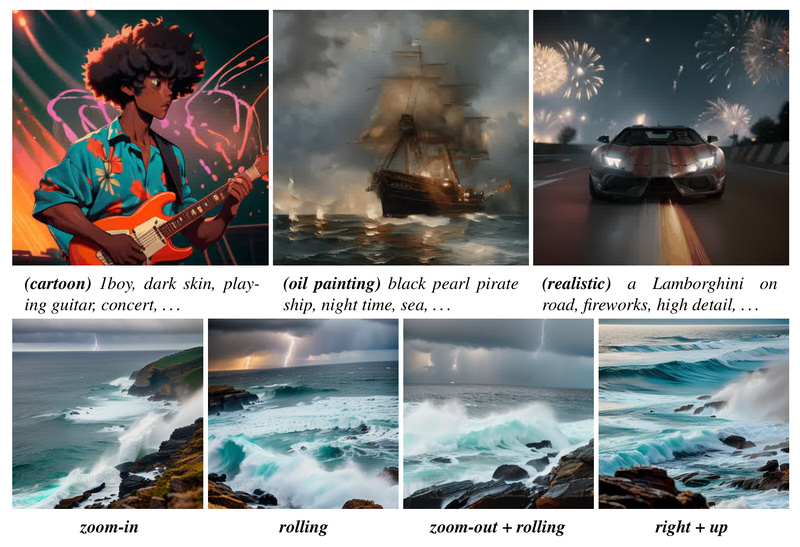
If you’ve spent time fine-tuning a Stable Diffusion model—perhaps with DreamBooth or LoRA—to generate your ideal character, product mockup, or artistic style, you’ve likely faced a frustrating limitation: that model only creates still images. Turning those personalized creations into smooth, coherent animations traditionally requires massive video datasets, weeks of training, or complex architectural changes. AnimateDiff solves this problem with remarkable simplicity.
AnimateDiff is a plug-and-play framework that injects motion into any personalized text-to-image (T2I) diffusion model—without requiring you to retrain or even modify your existing model. Developed by researchers at institutions including CUHK and MIT, it introduces a lightweight, pre-trained motion module that works seamlessly with popular community models like Realistic Vision, ToonYou, or Lyriel. The result? High-quality, temporally coherent animations in minutes, not months.
How It Works: Motion as a Modular Add-On
At the heart of AnimateDiff is a clever insight: motion and visual appearance can be decoupled. Instead of training a whole new text-to-video model from scratch, AnimateDiff trains a motion module once on real-world video data to learn general motion priors—like object movement, camera dynamics, and temporal continuity. This module is then inserted into your existing T2I model during inference.
Because the base T2I model (e.g., Stable Diffusion 1.5 or SDXL) remains untouched, your custom style, domain knowledge, and fine-tuned details are fully preserved. The motion module simply “animates” the generation process across time steps, producing a sequence of 16–24 frames that evolve smoothly while respecting your original prompt and model weights.
This “train once, use everywhere” design means one motion module can animate dozens of different community models—eliminating redundant training and dramatically lowering the barrier to entry for animation.
Real-World Use Cases: Where AnimateDiff Delivers Value
AnimateDiff shines in scenarios where creators already have strong, personalized image models but lack an efficient path to motion:
- Character Animation: Bring your custom anime or realistic character to life with natural head turns, walking cycles, or expressive gestures—no rigging or keyframing needed.
- Product Prototyping: Generate animated previews of AI-designed products (e.g., rotating watches, opening packaging) directly from your brand-aligned generative model.
- Digital Storytelling: Extend static illustrations into short animated clips for social media, indie games, or narrative experiences.
- Creative Exploration: Rapidly test motion ideas by animating existing AI art, turning a gallery of stills into a dynamic storyboard.
For researchers and developers, AnimateDiff also offers a low-cost way to prototype text-to-video systems without building custom video datasets or modifying diffusion architectures.
Getting Started: Simplicity by Design
Using AnimateDiff is intentionally straightforward:
- Clone the official repository and install dependencies.
- Choose a configuration file for your target model (e.g.,
RealisticVision.yaml). - Run a single command—the script automatically downloads the required motion module and adapter.
- Find your generated
.mp4or.gifin thesamples/folder.
For non-technical users, a built-in Gradio app provides a visual interface to input prompts, select models, and generate animations with a click. Additionally, AnimateDiff is officially supported in Hugging Face’s Diffusers library, enabling integration into existing ML pipelines with just a few lines of code.
The framework handles checkpoint management automatically, so first-time users don’t need to manually hunt for weights or worry about version mismatches.
Advanced Control: MotionLoRA and SparseCtrl
While the base AnimateDiff module generates general motion, two lightweight extensions offer precise control:
-
MotionLoRA: These tiny (77 MB) adapters fine-tune the motion module for specific camera behaviors—zooming in/out, panning left/right, tilting, or rolling. Each MotionLoRA is trained on minimal data and can be swapped at inference time without retraining the core model.
-
SparseCtrl: For even greater fidelity, SparseCtrl lets you condition the animation on sparse inputs—such as a few RGB reference frames or hand-drawn sketches. This is especially useful for storyboarding or ensuring key poses appear at specific frames.
Both techniques maintain AnimateDiff’s core philosophy: minimal training, maximal reuse.
Key Limitations to Consider
AnimateDiff is powerful but not magic. Users should be aware of current constraints:
- Minor flickering may appear in some frames due to the inherent challenge of temporal consistency in diffusion models.
- For tasks like animating an existing image (e.g., “make this portrait blink”), the input image should ideally be generated by the same community model used for animation—this ensures style alignment and reduces artifacts.
- AnimateDiff prioritizes personalized animation over general text-to-video performance. If your goal is high-fidelity, cinematic video from scratch (without a custom image model), dedicated T2V models may be more suitable.
That said, for its intended use case—animating personalized models—it remains unmatched in accessibility and quality.
Summary
AnimateDiff answers a critical question for thousands of AI artists, developers, and researchers: “I have a perfect custom image model—how do I animate it without starting over?” By decoupling motion learning from visual generation, it delivers a truly plug-and-play solution that preserves your existing investments while unlocking dynamic new capabilities. With support for community models, easy scripting, GUI access, and optional motion control via MotionLoRA and SparseCtrl, it strikes a rare balance between power, simplicity, and compatibility. If you’re already using fine-tuned Stable Diffusion models, AnimateDiff is the fastest, most practical path to animation.