Imagine turning a static portrait—like the Mona Lisa or a headshot from your LinkedIn profile—into a vivid, talking avatar that not only syncs lips accurately but also moves its head, shifts expressions, and behaves like a real person. That’s exactly what AniTalker enables.
Developed by X-LANCE, AniTalker is an open-source framework that animates realistic and diverse talking faces using just one image and an audio file. Unlike many existing tools that focus narrowly on lip synchronization, AniTalker models the full spectrum of nonverbal facial dynamics—subtle eyebrow raises, natural head tilts, and expressive mouth movements—making the output feel genuinely human.
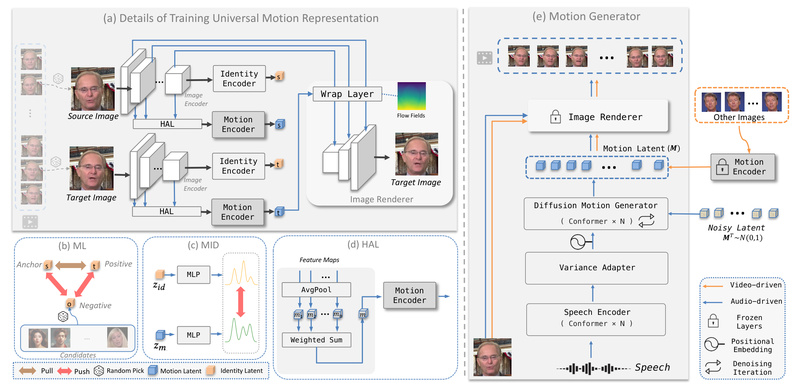
What sets it apart is its identity-decoupled facial motion encoding: the system learns how people move independently of who they are. This means motion patterns extracted from one speaker can be applied to any face, enabling flexible reuse across identities without retraining. Plus, thanks to self-supervised learning strategies, AniTalker minimizes the need for large labeled datasets—a major bottleneck in many animation pipelines.
For developers, researchers, digital creators, and educators, AniTalker offers a powerful, accessible solution to generate high-quality talking faces without complex rigs, motion capture, or professional voice-overs.
Key Strengths That Solve Real Problems
Beyond Lip-Sync: Full Facial Expressiveness
Most talking-face generators stop at matching mouth shapes to phonemes. AniTalker goes further by capturing rich, nonverbal cues—like head pose (yaw, pitch, roll), facial micro-expressions, and natural motion variance. This results in animations that don’t just talk but behave, significantly boosting realism and viewer engagement.
Identity-Decoupled Motion Representation
AniTalker’s core innovation lies in separating identity from motion. It trains a motion encoder that deliberately discards identity-specific details (via mutual information minimization) while preserving dynamic behavior. This decoupling allows:
- Reuse of motion sequences across different faces
- Better generalization to unseen identities
- Reduced risk of identity leakage in motion features
This design is especially valuable for avatar platforms where one voice actor’s performance can drive multiple digital personas.
Self-Supervised Learning Reduces Data Dependency
Instead of relying on large datasets with manual annotations (e.g., facial action units or 3D landmarks), AniTalker uses two self-supervised strategies:
- Intra-identity frame reconstruction: learning motion by reconstructing video frames from the same person
- Metric learning with identity disentanglement: ensuring motion encodings are identity-agnostic
This approach slashes labeling costs and makes the model more scalable for real-world deployment.
Ideal Use Cases for Your Projects
AniTalker excels in scenarios where you need natural, expressive avatars from minimal input. Consider these applications:
- Customer service avatars: Deploy lifelike virtual agents that speak with emotion and presence, enhancing user trust.
- Educational content: Convert lecture audio into engaging instructor avatars for e-learning platforms.
- Gaming & VR: Animate NPCs using voice dialogue without motion capture suits.
- Social media & marketing: Turn a celebrity photo or brand mascot into a talking video ad using pre-recorded scripts.
- Accessibility tools: Generate visual speech for the hearing impaired using any portrait and audio transcript.
All you need is one clear frontal portrait and an audio file—no 3D models, no tracking data, no studio setup.
Getting Started Is Simpler Than You Think
Despite its advanced architecture, AniTalker is designed for usability. The team provides clear tutorials for Windows, macOS, and even a Hugging Face Space for no-code experimentation.
Quick Start Workflow (Recommended)
- Install the environment using Conda and pip as specified in the repo.
- Download the recommended checkpoint:
stage2_audio_only_hubert.ckpt(along withstage1.ckpt). - Prepare your input:
- A portrait image (head centered, frontal view)
- An English audio clip (WAV format, clear speech)
- Run the demo script:
python ./code/demo.py
 --infer_type 'hubert_audio_only'
 --stage1_checkpoint_path 'ckpts/stage1.ckpt'
 --stage2_checkpoint_path 'ckpts/stage2_audio_only_hubert.ckpt'
 --test_image_path 'your_image.jpg'
 --test_audio_path 'your_audio.wav'
 --result_path 'outputs/your_result/'
That’s it. The model automatically handles motion sampling, rendering, and synchronization.
Optional Enhancements
- Pose control: Use
stage2_pose_only_hubert.ckptorstage2_full_control_hubert.ckptto manually adjust head movement for more dramatic expressions. - Super-resolution: Add
--face_srto upscale output from 256×256 to 512×512 using GFPGAN, reducing blur and enhancing detail.
Community contributors have also built Web UIs and video tutorials, lowering the barrier for non-developers.
Important Limitations and Best Practices
While powerful, AniTalker has boundaries shaped by its training data and design choices. Understanding these helps you succeed:
Language Matters
The model is trained primarily on English speech. Using non-English audio may cause unnatural lip movements, jitter, or facial distortion. For best results, stick to clear, English narration.
Portrait Guidelines
- Center the face: The head should occupy the central region of the image, consistent with training data preprocessing.
- Use frontal poses: Side profiles or extreme angles can lead to warping artifacts due to 2D-based rendering.
- Avoid cluttered backgrounds: The model doesn’t segment full bodies or complex scenes—just the face and immediate surroundings.
No Gaze Modeling (Yet)
AniTalker doesn’t control eye direction, so generated avatars may appear “unfocused.” To improve immersion, ensure your source portrait shows direct eye contact. For advanced gaze control, consider integrating external tools like VASA-1 or PD-FGC post-generation.
Ethical and Practical Boundaries
The model isn’t trained on diverse demographics, fast speech, or silent segments. It’s also not suited for full-body animation or multi-person scenes. Always review outputs critically and avoid sensitive or misleading applications.
Summary
AniTalker bridges the gap between simplicity and expressiveness in talking-face generation. By decoupling identity from motion and leveraging self-supervised learning, it delivers vivid, diverse animations from just one image and an audio clip—no complex setup required. While it works best with English speech and frontal portraits, its open-source nature, community support, and controllable variants make it a compelling choice for researchers, developers, and content creators looking to bring static images to life in a natural, scalable way.
If your project demands avatars that speak like humans—not robots—AniTalker is worth exploring today.