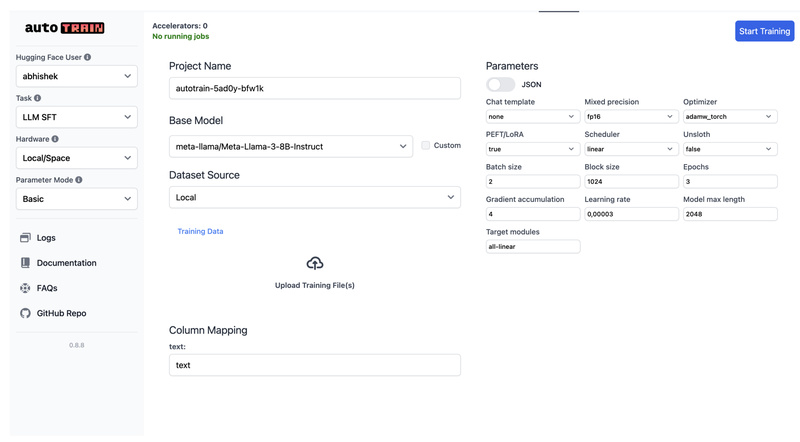
In today’s fast-moving AI landscape, fine-tuning state-of-the-art models on custom data is no longer a luxury—it’s a necessity for building tailored, production-ready solutions. Yet, most tooling still demands deep ML expertise, hours of boilerplate code, and careful orchestration across frameworks. Enter AutoTrain (also known as AutoTrain Advanced): an open-source, no-code library from Hugging Face that streamlines model training across a wide range of tasks and modalities—without requiring you to write a single line of training code.
Built for engineers, product teams, and technical decision-makers, AutoTrain removes the friction of model customization. Whether you’re adapting a large language model (LLM) for customer support, labeling internal images, or building a text regressor from structured logs, AutoTrain offers a unified, best-practice approach that works locally or in the cloud.
Why AutoTrain Stands Out
AutoTrain isn’t just another training wrapper—it’s a thoughtfully designed system that addresses real-world pain points in applied machine learning:
- No fragmented tooling: Instead of juggling separate libraries for LLMs, vision, and tabular tasks, you get one consistent interface.
- Zero ML boilerplate: Pre-built configurations handle optimizer selection, quantization, PEFT adapters, and more—based on community and Hugging Face best practices.
- Deployment-ready outputs: Trained models can be automatically pushed to the Hugging Face Hub, making versioning, sharing, and integration seamless.
For teams evaluating AI solutions, this means faster iteration, reduced engineering overhead, and lower risk of implementation errors.
Broad Task Support Across Modalities
AutoTrain supports a growing list of machine learning tasks, covering the most common needs in modern AI projects:
Language and LLM Tasks
- Supervised Fine-Tuning (SFT) for instruction-tuned models
- Preference-based alignment via DPO (Direct Preference Optimization) and ORPO
- Reward modeling for reinforcement learning pipelines
- Text classification and regression for sentiment, scoring, or tagging
- Sequence-to-sequence generation and extractive question answering (coming soon)
Vision and Multimodal
- Image classification and regression (e.g., quality scoring, defect detection)
- Visual Language Model (VLM) fine-tuning (coming soon), enabling custom multimodal assistants
Structured Data
- Tabular classification and regression, useful for business intelligence or operational forecasting
This breadth means you can standardize on AutoTrain across multiple projects—reducing onboarding time and maintenance costs.
Built for Real-World Use Cases
AutoTrain shines in practical scenarios where speed, reliability, and simplicity matter:
- Domain-specific LLMs: Fine-tune models like SmolLM2 or Mistral on internal documentation or customer chat logs to build accurate, controllable assistants.
- Internal tooling: Adapt open-source vision models to classify product images, medical scans, or satellite data without building custom pipelines.
- Rapid prototyping: Test hypotheses on text or tabular data in hours, not weeks, by plugging in your dataset and selecting a task.
By abstracting away framework-specific details (like Trainer loops in 🤗 Transformers or PyTorch Lightning boilerplate), AutoTrain lets you focus on data quality and business logic—not infrastructure.
Simple and Flexible Usage
AutoTrain offers two intuitive pathways to get started—no matter your preferred workflow.
Option 1: Web UI for Interactive Training
Launch a local web interface with:
autotrain app --port 8080 --host 127.0.0.1
From there, you can upload your data (in the required format), select a base model, and configure training—all through a browser. This UI also works on Google Colab or Hugging Face Spaces, enabling cloud-based runs with minimal setup.
Option 2: Declarative YAML + CLI for Automation
Prefer scripts and reproducibility? Define your experiment in a YAML config file. For example, to fine-tune an LLM with 4-bit quantization and LoRA adapters:
task: llm-sft
base_model: HuggingFaceTB/SmolLM2-1.7B-Instruct
project_name: domain-smollm2-finetune
data:  path: my_dataset  train_split: train  column_mapping:  text_column: messages
params:  epochs: 2  batch_size: 1  lr: 1e-5  quantization: int4  peft: true
hub:  push_to_hub: true
Then run:
autotrain --config config.yaml
This approach integrates cleanly into CI/CD pipelines, MLOps workflows, or scheduled retraining jobs.
Limitations and Practical Considerations
While powerful, AutoTrain isn’t a magic bullet. Be aware of these constraints:
- Data must be pre-formatted according to task-specific schemas (e.g., JSONL for LLM SFT with a
messagesfield). - Python ≥3.10 is required, along with GPU-compatible environments (CUDA, PyTorch) for acceptable training speeds.
- Some tasks are still in development, such as token classification and VLM fine-tuning—marked as “Coming Soon” in the official support matrix.
- Costs are infrastructure-only: AutoTrain itself is free and open-source. You only pay for compute when using Hugging Face Spaces or your own cloud/local hardware.
These are reasonable trade-offs for a tool that prioritizes correctness and best practices over “just make it work” hacks.
Summary
AutoTrain delivers on a critical promise: making custom model training accessible, consistent, and production-ready—without sacrificing flexibility. For technical leaders evaluating AI tooling, it reduces the barrier to deploying tailored models across text, vision, and structured data, while aligning with open-source and MLOps best practices. If you’re tired of stitching together fragile training scripts or managing disjointed frameworks, AutoTrain offers a compelling, future-proof alternative.