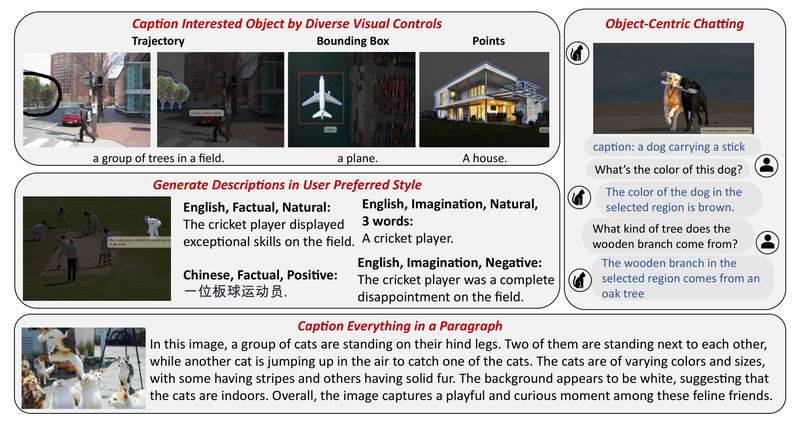
Traditional image captioning systems produce static, one-size-fits-all descriptions—often generic, inflexible, and disconnected from actual user intent. What if you could click on any object in an image and instantly generate a caption tailored to your needs: concise or detailed, positive or neutral, in English or Spanish, factual or imaginative?
Caption Anything (CAT) makes this possible. Built on foundation models like Segment Anything (SAM) and BLIP/BLIP-2, and enhanced with ChatGPT’s language capabilities, Caption Anything is a modular, interactive framework that supports diverse multimodal controls—both visual (points, boxes, mouse trajectories) and linguistic (sentiment, length, language, factuality). Crucially, it does this without requiring custom training data, leveraging the power of pre-trained models to deliver flexible, user-aligned image descriptions on demand.
For technical decision-makers evaluating tools for vision-language applications, Caption Anything offers a rare blend of interactivity, adaptability, and ease of integration—ideal for scenarios where user intent varies dynamically and generic captions fall short.
Why Generic Captions Aren’t Enough
Out-of-the-box image captioning models typically describe entire scenes with averaged attention—”a dog sitting on a couch next to a window.” But real-world use cases demand precision and personalization:
- A visually impaired user might want a concise, neutral description of just the person in the foreground.
- A content moderator may need a factual, zero-imagination summary of a flagged region.
- An e-commerce platform could benefit from multilingual, sentiment-adjusted captions for localized product imagery.
Standard models can’t satisfy these varied, context-sensitive requests. Retraining them for every new control type is impractical due to the scarcity of aligned multimodal annotation data. Caption Anything sidesteps this bottleneck by orchestrating existing foundation models into a unified, controllable pipeline—turning user inputs directly into tailored outputs.
Core Capabilities: Visual + Language Controls
Caption Anything introduces two complementary control dimensions that empower users to steer caption generation interactively:
Visual Controls: Specify What to Describe
Instead of describing the whole image, users can select regions of interest using intuitive inputs:
- Clicks: Positive (object of interest) or negative (background exclusion) points.
- Bounding boxes: To isolate larger or irregular areas.
- Mouse trajectories (beta): For tracing paths or complex shapes.
These inputs are processed by SAM to generate high-quality masks, ensuring the captioner focuses precisely on the intended visual content.
Language Controls: Define How to Describe It
Once the region is selected, users refine the textual output via natural language directives:
- Length: e.g., “30 words” or “short.”
- Sentiment: “positive,” “negative,” or “natural.”
- Factuality: Toggle “imagination” on/off to enforce strict visual grounding.
- Language: Generate captions in English, Chinese, Spanish, and more.
Under the hood, these controls are passed to ChatGPT (via LangChain integration) along with the segmented image and an initial caption from BLIP or BLIP-2, enabling coherent, instruction-following refinement.
Practical Use Cases for Teams and Projects
Caption Anything isn’t just a research demo—it’s a deployable solution for real-world challenges:
- Web Accessibility: Dynamically generate alt-text for specific UI elements or user-highlighted content, improving screen reader experiences.
- E-commerce & Retail: Create on-demand, localized product descriptions based on user interaction (e.g., clicking a dress in a model photo).
- Visual Assistants: Build interactive tools that let users “chat” about selected objects for deeper understanding—ideal for educational or assistive tech.
- Content Moderation & Analytics: Generate factual, focused summaries of flagged image regions for review workflows.
- Multilingual Media Tools: Instantly produce region-specific captions in multiple languages from a single image.
Because it requires no task-specific training, teams can prototype and iterate rapidly—testing user flows without data collection overhead.
Getting Started: Evaluate in Minutes
Caption Anything is designed for quick technical evaluation. Here’s how to run it:
-
Clone the repository:
git clone https://github.com/ttengwang/Caption-Anything.git
cd Caption-Anything
-
Install dependencies (Python ≥ 3.8.1):
pip install -r requirements.txt
-
Set your OpenAI API key:
export OPENAI_API_KEY=your_key_here  # Linux/macOS
# or in Windows PowerShell:
$env:OPENAI_API_KEY = "your_key_here"
-
Launch the demo (choose based on GPU memory):
- ~5.5 GB:
python app.py --segmenter base --captioner blip - ~8.5 GB:
python app_langchain.py --segmenter base --captioner blip2 - ~13 GB:
python app_langchain.py --segmenter huge --captioner blip2
- ~5.5 GB:
Alternatively, use the Python API for programmatic integration:
from caption_anything import CaptionAnything, parse_augment
args = parse_augment()
visual_controls = {"prompt_type": ["click"],"input_point": [[500, 300]],"input_label": [1],"multimask_output": "True"
}
language_controls = {"length": "20","sentiment": "natural","imagination": "False","language": "English"
}
model = CaptionAnything(args, openai_api_key)
output = model.inference("image.jpg", visual_controls, language_controls)
Pre-downloaded SAM checkpoints can reduce startup time and ensure reproducibility.
Limitations and Deployment Considerations
While powerful, Caption Anything comes with important constraints to consider:
- External API Dependency: Requires access to OpenAI’s API for language refinement—unsuitable for air-gapped or privacy-sensitive environments.
- GPU Memory: Even the lightest configuration needs ~5.5 GB VRAM; the full pipeline may exceed 13 GB.
- Domain Coverage: Relies on general-purpose models (BLIP, SAM, ChatGPT), which may lack expertise in specialized domains (e.g., medical imaging or industrial schematics).
- Online Requirement: ChatGPT integration necessitates internet connectivity.
For research or internal tooling, these trade-offs are often acceptable. For production systems, plan for API cost, latency, and fallback strategies.
Summary
Caption Anything redefines image captioning from a passive output into an interactive, user-driven dialogue between vision and language. By combining Segment Anything’s precise segmentation with ChatGPT’s controllable text generation, it delivers unprecedented flexibility—without the need for custom datasets or retraining. For teams building accessible interfaces, visual assistants, or multimodal analytics tools, Caption Anything offers a fast, modular, and highly adaptable starting point. With open-source code and clear evaluation pathways, it lowers the barrier to prototyping intelligent, intent-aware vision-language systems.