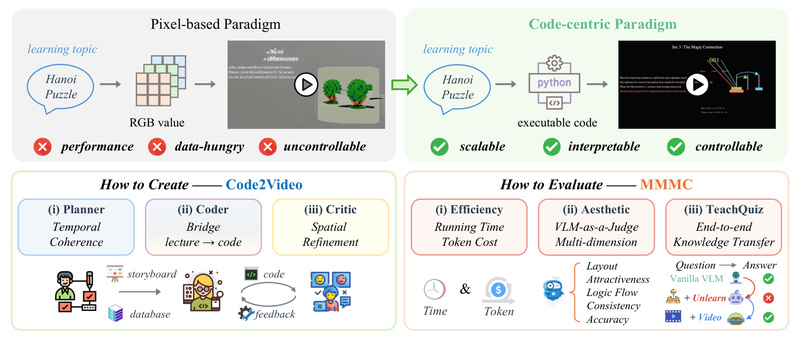
Traditional AI-powered video generators—especially those based on diffusion or pixel-level synthesis—struggle when it comes to creating high-quality educational content. While they may produce visually appealing clips, they often lack the precision, logical sequencing, and domain-specific clarity required for effective teaching, particularly in technical fields like mathematics, computer science, or engineering.
Enter Code2Video: a novel, code-centric framework that rethinks educational video generation by treating executable Python code—specifically Manim code—as the primary medium for video creation. Instead of relying on generative models to directly synthesize pixels from text prompts, Code2Video leverages a collaborative multi-agent system to plan, code, and critique videos in a structured, reproducible, and debuggable way. The result? Professional-grade educational videos that match the clarity and coherence of handcrafted tutorials like those from 3Blue1Brown—while remaining fully automatable and scalable.
Why Code2Video Solves a Real Problem
Most AI video tools today are optimized for entertainment or generic visual storytelling—not pedagogy. They falter when asked to:
- Accurately depict mathematical transformations
- Maintain consistent visual metaphors across time
- Animate step-by-step derivations with logical flow
- Ensure spatial precision (e.g., aligning equations with diagrams)
These limitations make them unsuitable for serious educational use. Code2Video addresses this gap by shifting from pixel generation to programmatic rendering. Because Manim is a math-aware animation engine, any video generated via Code2Video inherits built-in guarantees about correctness, reproducibility, and structure—critical traits for learners and educators alike.
Core Architecture: The Tri-Agent System
Code2Video’s power lies in its modular, agentic design. Three specialized agents work in concert:
Planner
The Planner takes a high-level knowledge point (e.g., “Fourier Series”) and breaks it into a temporally coherent lecture sequence. It outlines key visual elements needed at each step—equations, graphs, annotations—and prepares asset references (like icons or diagrams) to support comprehension.
Coder
The Coder translates the Planner’s outline into executable Manim code. Crucially, it incorporates scope-guided auto-fixing: if the generated code fails to render, the agent analyzes error logs and iteratively corrects the code—making the system robust even when initial outputs are flawed.
Critic
The Critic uses a vision-language model (VLM) with visual anchor prompts to evaluate the rendered frames. It assesses layout clarity, alignment of text and visuals, and overall aesthetic coherence—then provides feedback to refine the code. This loop ensures the final video is not just functional, but pedagogically effective.
This pipeline makes Code2Video interpretable (you can inspect and debug the code), controllable (modify any step without retraining), and scalable (batch-process hundreds of topics).
Ideal Use Cases
Code2Video excels in scenarios where accuracy, structure, and visual fidelity are non-negotiable:
- University instructors creating supplementary video content for STEM courses
- Online learning platforms automating the production of concept explainers
- Educational startups building scalable, code-backed video libraries
- Researchers prototyping visual explanations for complex algorithms or theorems
It’s particularly well-suited for topics that benefit from dynamic visual reasoning—linear algebra transformations, algorithm walkthroughs, signal processing visualizations, or physics simulations—where static slides or unstructured AI videos fall short.
Getting Started: Practical Setup
Using Code2Video requires basic familiarity with Python and APIs, but the project provides clear tooling:
- Install dependencies: After cloning the repo, run
pip install -r requirements.txtin thesrc/directory. Ensure Manim Community (v0.19.0) is properly installed—the backbone of all video rendering. - Configure API keys: Edit
api_config.jsonto include:- An LLM API key (Claude-4-Opus recommended) for the Planner and Coder
- A VLM API key (Gemini, especially gemini-2.5-pro-preview-05-06) for the Critic
- An IconFinder API key (optional) to auto-fetch relevant icons
- Generate videos:
- For a single concept: run
sh run_agent_single.sh --knowledge_point "Your Topic" - For batch processing: use
sh run_agent.shwith a predefined topic list
- For a single concept: run
Outputs are organized into timestamped folders, containing both rendered videos and the underlying Manim code—enabling full reproducibility and customization.
Limitations to Consider
While powerful, Code2Video isn’t a universal video solution:
- API dependency: Performance and cost rely on external LLM/VLM services.
- STEM-focused: Best for structured, logic-driven content—not narrative storytelling or artistic expression.
- Manim learning curve: Users benefit from knowing basic Manim syntax, though the Coder handles most heavy lifting.
- Limited multimodal input: Currently accepts only textual knowledge points, not diagrams or pre-existing slides.
These constraints make it a specialized tool—but for its target domain, it’s unmatched in precision and control.
Summary
Code2Video redefines educational video generation by grounding it in executable code rather than stochastic pixel synthesis. Its tri-agent architecture delivers videos that are not only visually polished but also logically sound, debuggable, and scalable. For educators, developers, and edtech builders seeking a reliable way to automate high-fidelity STEM explanations, Code2Video offers a compelling, production-ready paradigm—one that bridges the gap between AI automation and pedagogical rigor.