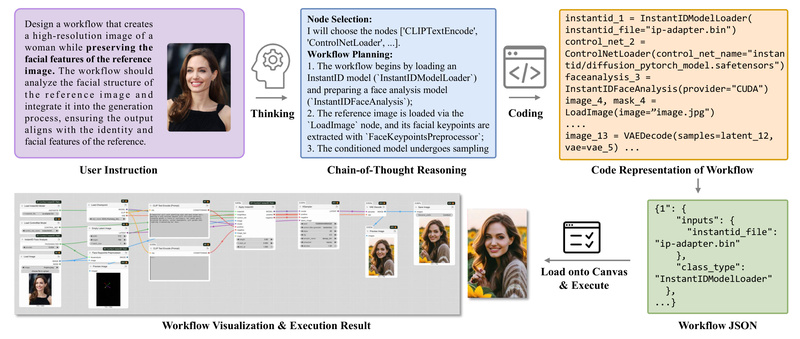
Building visual AI workflows in ComfyUI offers immense creative flexibility—but mastering its node-based interface demands significant expertise. Users often struggle with assembling valid, efficient pipelines from hundreds of specialized nodes, managing dependencies, and debugging subtle connection or parameter errors. Enter ComfyUI-R1, the first large reasoning model purpose-built for automated ComfyUI workflow generation, debugging, and optimization.
Unlike generic chatbots or simple prompt-to-workflow converters, ComfyUI-R1 leverages long chain-of-thought (CoT) reasoning trained on over 4,000 real-world workflows. It doesn’t just guess node arrangements—it plans, validates, and refines workflows with awareness of structural logic, node compatibility, and user intent. The result? A true development partner that lowers the barrier for beginners while accelerating iteration for experts.
From Plain English to Valid Workflows in Seconds
One of ComfyUI-R1’s standout capabilities is its ability to generate fully executable workflows from natural language prompts. Describe your goal—“I want a workflow for anime-style portraits with cinematic lighting and detail enhancement”—and ComfyUI-R1 returns four options: three high-quality workflows curated from its library and one freshly AI-generated.
Critically, the generated workflow isn’t just a rough sketch. Thanks to a two-stage training process—CoT fine-tuning followed by reinforcement learning with a hybrid rule-metric reward—the model achieves a 97% format validity rate. This ensures the output is not only syntactically correct but also structurally sound, with proper node connections and parameter assignments ready for immediate import into ComfyUI.
This feature is transformative for newcomers overwhelmed by ComfyUI’s complexity and for seasoned artists seeking rapid prototyping without manual node wiring.
Debug, Rewrite, and Optimize Like a Pro
ComfyUI-R1 goes far beyond one-time generation. It acts as an intelligent co-developer throughout the workflow lifecycle:
- Automatic Debugging: When a workflow fails, ComfyUI-R1 pinpoints missing models, mismatched data types, or broken connections, then suggests precise fixes. If a required model isn’t installed, it even prompts you to download it directly.
- Context-Aware Rewriting: Not happy with the output? Tell it “Add a detail enhancement node after the upscaler” or “Switch to a realistic style base model,” and it will modify the current canvas accordingly—adjusting parameters, inserting nodes, or re-routing connections.
- Parameter Tuning via GenLab: Define parameter ranges (e.g., CFG scale from 5–12, denoise steps from 20–30), and ComfyUI-R1 automatically runs all combinations, generating side-by-side visual comparisons to help you identify the optimal settings—no manual tweaking required.
These tools eliminate the frustrating trial-and-error cycles typical in visual programming environments, turning debugging from a chore into a guided optimization process.
Local Environment Awareness for Personalized Assistance
A key differentiator of ComfyUI-R1 is its integration with your local ComfyUI instance. It doesn’t operate in a vacuum—it knows which nodes and models you have installed. This context awareness enables tailored recommendations:
- Suggest compatible LoRAs or checkpoints based on your request and available assets.
- Recommend downstream nodes that logically follow your current selection (e.g., suggesting a latent upscale node after a VAE decode).
- Avoid proposing workflows that rely on uninstalled custom nodes, reducing compatibility errors.
This tight coupling with your environment ensures suggestions are not just theoretically sound but practically executable in your setup.
Ideal Use Cases: Who Benefits Most?
ComfyUI-R1 shines in several scenarios:
- Beginners intimidated by ComfyUI’s node jungle can start with working workflows and learn by example.
- AI Artists & Designers can iterate faster—exploring stylistic variations or technical enhancements without rebuilding pipelines from scratch.
- Research & Development Teams automating creative pipelines gain a reliable tool for generating and validating standardized workflows.
- Tool Developers integrating workflow intelligence into creative platforms can leverage ComfyUI-R1’s reasoning engine as a foundation.
By reducing cognitive load, minimizing errors, and accelerating experimentation, ComfyUI-R1 turns workflow creation from a bottleneck into a creative enabler.
Current Limitations and Best Practices
While powerful, ComfyUI-R1 has practical boundaries users should note:
- Training Data Cutoff: Models or nodes released after May 2025 (e.g., Wan2.2) may not be recognized, leading to generation failures. In such cases, explicitly mentioning known alternatives or providing expert hints can help.
- Context Length Sensitivity: Complex rewrite requests carry heavy context. To avoid interruptions, periodically clear the conversation history using the “Clear Context” button.
- Setup Requirements: The system requires an API key (obtained via email) and proper configuration of a backend LLM (OpenAI or local via LMStudio).
These constraints are manageable with basic awareness and align with typical expectations for advanced AI tooling.
Getting Started Is Straightforward
Installation takes minutes:
- Clone the repository into your
ComfyUI/custom_nodesdirectory. - Install dependencies via
pip install -r requirements.txt. - Activate the Copilot panel in ComfyUI, register for an API key, and configure your preferred language model.
Regular updates via git pull or ComfyUI Manager ensure access to the latest features, including the enhanced v2.0 agent architecture.
Summary
ComfyUI-R1 redefines what’s possible in visual AI workflow automation. By combining deep reasoning, structural awareness, and local environment integration, it solves the core pain points of complexity, debugging, and iteration that plague ComfyUI users. Whether you’re a beginner seeking your first working pipeline or an expert optimizing production workflows, ComfyUI-R1 delivers actionable intelligence—not just suggestions, but executable, valid, and adaptable solutions.