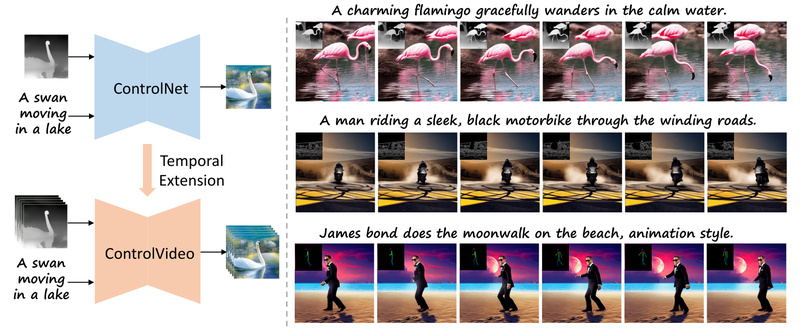
Generating high-quality videos from text has long been a challenging frontier in generative AI—especially compared to the rapid advances in text-to-image models. Most existing text-to-video approaches require extensive retraining to model temporal dynamics, demand powerful hardware, and often suffer from visual inconsistencies like flickering, drifting subjects, or incoherent motion over time.
Enter ControlVideo: a clever, training-free framework that enables controllable, temporally coherent video synthesis by leveraging existing ControlNet architectures and structural guidance from reference motion sequences. Without any fine-tuning or model adaptation, ControlVideo produces short and even long videos that maintain appearance consistency, reduce flicker, and respect both textual prompts and structural inputs—such as depth maps, human poses, or edge outlines—typically within minutes on a single NVIDIA 2080 Ti.
For technical decision-makers, researchers, and developers seeking an efficient, plug-and-play solution for structured video generation, ControlVideo offers a practical alternative that sidesteps the massive compute and data overhead of training video diffusion models from scratch.
Why ControlVideo Stands Out: A Training-Free Innovation
Traditional video diffusion models often demand costly training on large-scale video datasets to learn temporal coherence—a barrier for most teams lacking GPU clusters or labeled video corpora. ControlVideo circumvents this entirely by adapting pre-trained ControlNet models (originally built for image generation) to the video domain without any retraining.
This “training-free” design is more than a technical convenience—it dramatically lowers the entry barrier. You don’t need to curate video datasets, wait weeks for training, or manage complex optimization pipelines. Instead, you reuse off-the-shelf ControlNet checkpoints (e.g., for depth, canny edges, or OpenPose) and apply them frame-by-frame while enforcing cross-frame consistency through novel architectural tweaks. The result: high-fidelity video outputs that align with both your prompt and your motion guide, all without touching the model weights.
Key Technical Features That Solve Real Video Generation Problems
ControlVideo introduces three core mechanisms that directly address well-known pain points in video synthesis:
Cross-Frame Attention for Appearance Consistency
One of the biggest issues in naïve frame-by-frame generation is that objects or characters may subtly change appearance—shifting colors, shapes, or styles—between frames. ControlVideo injects fully cross-frame interaction into the self-attention layers of the diffusion model. This allows each frame to “see” visual features from other frames during denoising, locking in consistent object identities and appearances across the entire sequence.
Interleaved-Frame Smoother to Reduce Temporal Flicker
Even with consistent content, videos can appear jittery due to high-frequency noise or inconsistent lighting between adjacent frames. ControlVideo mitigates this with an interleaved-frame smoother that uses frame interpolation (via RIFE) on alternating frames during specific denoising timesteps (e.g., steps 19–20). This temporal smoothing dramatically reduces flickering while preserving motion dynamics.
Hierarchical Sampler for Efficient Long-Video Synthesis
Generating long videos (e.g., 30+ frames) in one pass is memory-intensive and often leads to drift. ControlVideo’s hierarchical sampler breaks long sequences into short clips, synthesizes them with overlapping context, and stitches them together with holistic coherence. This enables scalable video generation—without exploding VRAM usage or sacrificing continuity.
Ideal Use Cases: When to Choose ControlVideo
ControlVideo isn’t designed for fully free-form, text-only video generation. Instead, it excels in structured, reference-guided scenarios, such as:
- Animation prototyping: Use a rough pose sequence or sketch video to generate a stylized animated clip (e.g., “Hulk dancing on the beach, cartoon style”).
- Visual storytelling: Turn a depth-mapped drone flyover into a cinematic scene (“A steamship on the ocean at sunset, sketch style”).
- Marketing content: Generate product demos guided by edge outlines from real footage (e.g., a jeep turning on a mountain road).
- Research & education: Quickly validate how different motion priors (pose, depth, edges) affect generative video output without training overhead.
In all these cases, you already have—or can easily extract—a structural video cue. ControlVideo leverages that cue to anchor generation, ensuring the output respects both motion trajectory and textual description.
Getting Started: Minimal Setup, Maximum Flexibility
Using ControlVideo is straightforward for anyone familiar with diffusion models:
- Download pre-trained weights: This includes Stable Diffusion v1.5 and ControlNet variants (canny, depth, openpose) into the
checkpoints/directory, plus the RIFE interpolation model (flownet.pkl). - Install dependencies: A Python 3.10 environment with standard libraries like
diffusers,controlnet-aux, and optionallyxformersfor memory efficiency. - Run inference with a single command:
python inference.py --prompt "A striking mallard floats effortlessly on the sparkling pond." --condition "depth" --video_path "data/mallard-water.mp4" --output_path "outputs/" --video_length 15 --smoother_steps 19 20 --width 512 --height 512 --frame_rate 2 --version v10
No fine-tuning. No dataset preparation. Just a text prompt, a guiding video (from which depth/pose/edges are auto-extracted), and a few minutes of inference time.
Limitations and Practical Considerations
While powerful, ControlVideo has clear boundaries:
- Requires a motion reference: You must supply a video input to extract structural cues. It cannot generate from text alone.
- Limited to supported ControlNet modalities: Currently works with canny, depth, and human pose. Other conditioning types (e.g., semantic segmentation) aren’t natively supported unless you integrate additional ControlNet weights.
- Quality depends on motion alignment: If your input video’s motion doesn’t match the prompt semantics (e.g., using a walking pose to generate a flying bird), results may be inconsistent or distorted.
These aren’t flaws—they’re design trade-offs that prioritize efficiency and controllability over open-ended creativity.
Summary
ControlVideo delivers a rare combination: high-quality, controllable video generation without training. By building on ControlNet’s structural conditioning and adding smart temporal modules, it solves key problems like flicker, appearance drift, and scalability—making it a compelling choice for teams needing reliable, reference-guided video synthesis on modest hardware. If your workflow already involves motion priors or structural sketches, ControlVideo is likely the fastest path from idea to coherent video output.