DragDiffusion is an open-source framework that brings pixel-precise, point-based image manipulation to both real-world photographs and AI-generated images—without requiring users to write code or manually train models outside a graphical interface. Built on large-scale pretrained diffusion models, it overcomes a key limitation of earlier tools like DragGAN, which were constrained by the narrow domain coverage of generative adversarial networks (GANs). By operating in the latent space of diffusion models and leveraging their rich semantic and geometric features, DragDiffusion enables intuitive “drag-and-drop” editing: you simply click a handle point on an object and a target point where you want it moved, and the model intelligently warps the image while preserving identity, structure, and realism.
Designed for practitioners who need controllable, non-destructive image editing—such as product designers, digital artists, computer vision researchers, and AI developers—DragDiffusion balances precision, generality, and usability in a way few tools currently do.
How DragDiffusion Works
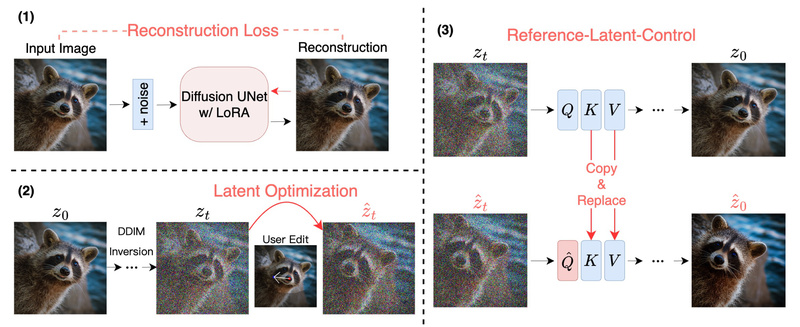
At its core, DragDiffusion optimizes latent representations within a diffusion model to align selected image regions with user-specified spatial transformations. Unlike pixel-level warping, this approach respects the internal consistency of the image by using feature maps from the diffusion UNet as supervision signals during optimization. These features encode high-level semantics (e.g., “this is an eye” or “this is a car wheel”), allowing the model to deform objects realistically without breaking their identity or context.
To further enhance fidelity—especially when editing real photos—DragDiffusion integrates two key techniques:
- LoRA fine-tuning: A lightweight adapter trained on the input image to anchor its visual identity during editing.
- Latent-MasaCtrl: A guidance mechanism inspired by mutual self-attention control, which improves structural consistency between source and edited regions.
For diffusion-generated images, the system also supports FreeU, a technique that sharpens details and reduces artifacts during manipulation.
Key Features
Interactive Point-Based Editing
Users interact directly with the image: click a “handle” point on an object (e.g., a person’s nose) and a “target” point (e.g., slightly to the left), and DragDiffusion smoothly moves the feature while preserving surrounding details. This mimics natural object manipulation without manual masking or complex parameter tuning.
Dual Workflow Support
DragDiffusion handles two distinct scenarios seamlessly:
- Editing real images: Upload a photo, provide a text prompt describing its content (e.g., “a smiling woman wearing sunglasses”), train a LoRA in under 20 seconds (on an A100 GPU), then drag.
- Editing AI-generated images: Generate an image directly within the UI using custom prompts and parameters, then drag objects or features immediately—no external generation step needed.
Flexible and Practical Design
- Supports arbitrary image aspect ratios, unlike many fixed-resolution GAN-based editors.
- Entire pipeline runs in a Gradio-based UI—no command-line scripts required for LoRA training or editing.
- Works with standard diffusion models (e.g., Stable Diffusion) and allows local model loading for offline or restricted environments.
Ideal Use Cases
DragDiffusion excels in scenarios where precision, realism, and creative control matter:
- E-commerce & product photography: Reposition products, adjust lighting direction, or tweak object orientation without reshooting.
- Portrait retouching: Gently adjust facial features (e.g., eye position, jawline) while preserving identity and skin texture.
- Concept art & generative design: Modify poses, object placement, or scene composition in AI-generated illustrations iteratively and non-destructively.
- Research prototyping: Test spatial reasoning, object persistence, or feature correspondence in diffusion models using a standardized interface.
Because it works on both real and synthetic images, it bridges the gap between traditional photo editing and generative AI workflows.
Getting Started
Installation is straightforward using Conda:
conda env create -f environment.yaml
conda activate dragdiff
python3 drag_ui.py
The UI guides users through two main paths:
- For real images: Upload → enter a descriptive prompt → click “Train LoRA” → draw an editable mask → place handle/target points → click “Run”.
- For generated images: Set generation parameters → click “Generate Image” → define mask and points → click “Run”.
All steps occur within the browser interface, and LoRA training is fully integrated—no switching between terminals or scripts.
Practical Limitations
While powerful, DragDiffusion is a research prototype, not a commercial-grade application. Users should consider:
- Hardware requirements: ~14 GB GPU memory (NVIDIA recommended); Linux environment preferred.
- Prompt dependency: Real-image editing requires an accurate text prompt to guide LoRA training and latent optimization.
- Edge-case robustness: Complex scenes (e.g., dense crowds, transparent objects) may produce imperfect results.
- Legal and ethical use: The tool should be used responsibly and in compliance with local laws, as emphasized in the project’s disclaimer.
Summary
DragDiffusion stands out by combining the spatial precision of point-based manipulation with the generality of modern diffusion models. It solves a critical pain point: the inability of earlier interactive editors to work reliably across diverse image types—especially real-world photos. With built-in LoRA tuning, latent-space guidance, and a user-friendly interface, it lowers the barrier for high-fidelity image editing while remaining grounded in rigorous research. The release of DragBench, the first benchmark for point-based editing, further validates its performance across challenging, real-world scenarios. For anyone exploring controllable image generation or seeking a more intuitive alternative to manual retouching, DragDiffusion is worth testing today.