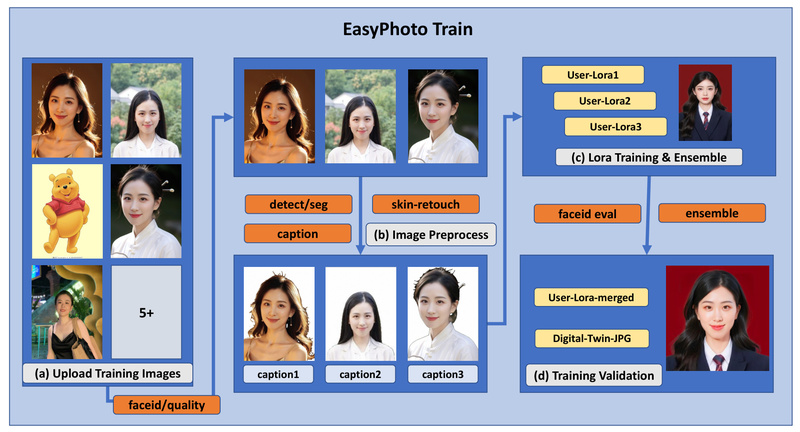
In today’s fast-paced digital world, creating high-quality, personalized photos—whether for professional headshots, marketing campaigns, or custom avatars—often requires photography sessions, retouching, and significant time investment. What if you could generate photorealistic portraits of real people using only a handful of smartphone photos and an AI tool that runs in your browser?
Enter EasyPhoto, a powerful and user-friendly plugin for Stable Diffusion WebUI that enables anyone to create a “digital doppelgänger” of a person using just 5 to 20 reference images. Built on fine-tuned LoRA models, EasyPhoto preserves facial identity with remarkable fidelity while allowing users to place that identity into any template—be it a passport photo, a fantasy scene, or even a video.
Unlike traditional face-swapping tools that often produce unnatural lighting or misaligned features, EasyPhoto leverages the generative power of Stable Diffusion combined with specialized preprocessing (face detection, saliency masking, skin retouching) and multi-stage diffusion to ensure realistic results that respect both identity and context.
Designed with both technical and non-technical users in mind, EasyPhoto lowers the barrier to entry for identity-aware AI image generation—without requiring deep learning expertise or custom model training pipelines.
Key Capabilities That Set EasyPhoto Apart
Identity-Preserving Generation via Personalized LoRA Models
EasyPhoto trains a lightweight LoRA (Low-Rank Adaptation) model specific to a user’s face using only 5–20 uploaded photos. This model captures identity-critical features—facial structure, skin tone, expression patterns—while remaining compatible with standard Stable Diffusion checkpoints. Once trained, this “digital twin” can be reused across countless templates.
Template-Driven, One-Click Generation
After training, users can generate new portraits by selecting a pre-designed template or uploading their own. The system intelligently aligns and blends the user’s face into the target pose and lighting using a two-stage diffusion process:
- First diffusion: Fuses the reference face into the template using ControlNet (Canny + OpenPose) to preserve pose and structure.
- Second diffusion: Refines the result at higher resolution for enhanced realism.
This approach avoids the “uncanny valley” pitfalls of naive face swapping by leveraging diffusion priors instead of direct pixel blending.
Multi-Person Support and SDXL Integration
EasyPhoto isn’t limited to single subjects. By enabling num_of_faceid > 1 in settings, users can generate group photos with multiple trained identities—ideal for team headshots or family portraits.
Moreover, EasyPhoto fully supports SDXL, allowing users to generate high-resolution, stylistically rich templates directly within the interface—no external image upload needed. This is especially valuable for creative professionals seeking magazine-quality outputs.
Accelerated Inference and Video Generation
With LCM-LoRA integration, EasyPhoto reduces generation time dramatically—producing results in as few as 12 diffusion steps (vs. the standard 50), without sacrificing quality.
Even more impressively, video inference is supported out of the box, requiring no additional training. Once a LoRA model is trained on still images, it can be applied to generate consistent, identity-preserving video frames—a rare capability in open-source portrait generation tools.
Flexible Deployment Options
Whether you prefer cloud or local setups, EasyPhoto accommodates:
- Cloud: One-click launch on Aliyun DSW (with free GPU credits), AutoDL, or pre-configured Docker images.
- Local: Full support for Windows and Linux environments with standard Stable Diffusion WebUI.
- Alternative UIs: ComfyUI integration is available via a companion repository.
Practical Applications for Teams and Builders
EasyPhoto solves real problems across industries:
- HR & Recruitment: Generate consistent, professional headshots for employee directories or LinkedIn profiles from casual phone photos.
- Gaming & Metaverse: Create personalized avatars that mirror real users’ appearances for immersive experiences.
- E-commerce & Marketing: Produce lifestyle product photos featuring real customers in branded settings—without photo shoots.
- AI Product Prototyping: Rapidly iterate on identity-aware features (e.g., virtual try-on, digital twins) during early-stage development.
Because it integrates seamlessly into the Stable Diffusion ecosystem—relying on familiar tools like ControlNet and WebUI—teams can adopt EasyPhoto without overhauling existing workflows.
Getting Started: A Simple Two-Step Workflow
Step 1: Train Your Digital Doppelgänger
- Upload 5–20 portrait photos (half-body recommended; avoid heavy occlusions like sunglasses).
- Assign a User ID (e.g., “Alice_Headshot”).
- Click Start Training—the system handles face detection, preprocessing, and LoRA fine-tuning automatically.
Default parameters work well for most cases, but advanced users can adjust resolution, learning rate, and training steps.
Step 2: Generate with Templates
- Select your trained User ID.
- Choose a built-in template or upload your own.
- Click Generate—results appear within seconds (faster with LCM-LoRA).
For multi-person generation, simply enable multi-face mode in settings and select multiple User IDs.
Tip: First-time users should try the live demo on ModelScope to evaluate quality before installing locally.
Limitations and Realistic Expectations
While powerful, EasyPhoto has practical constraints:
- Hardware Requirements: SDXL-based generation requires ≥16GB GPU VRAM. Lower-end GPUs may struggle with high-resolution outputs.
- Input Quality Matters: Training images with heavy shadows, extreme angles, or frequent occlusions (e.g., masks, large glasses) reduce identity consistency.
- Background Editing Is Limited: While faces are preserved faithfully, background manipulation remains constrained to the template’s original composition. Full scene editing is not yet supported.
- Ecosystem Dependency: EasyPhoto relies on Stable Diffusion WebUI and ControlNet. Users must install these dependencies, though setup guides are well-documented.
Importantly, EasyPhoto is not a general-purpose image generator—it excels specifically at identity-preserving portrait synthesis.
Summary
EasyPhoto delivers a rare combination: high-fidelity personalization, template flexibility, and accessible usability—all within a familiar WebUI interface. For project leads, product designers, or researchers needing to generate realistic, identity-consistent portraits without building a custom pipeline from scratch, it offers a production-ready solution that balances speed, quality, and ease of use.
If your use case involves placing real people into custom visual contexts—whether for professional, creative, or experimental purposes—EasyPhoto is worth evaluating. Start with the ModelScope demo or a Docker container to experience its capabilities risk-free.