Creating long, coherent, and visually rich videos with AI has long been bottlenecked by computational complexity, memory constraints, and error accumulation over time. Most video diffusion models struggle to scale beyond a few seconds without massive GPU resources—making them impractical for local development, rapid prototyping, or small-team workflows.
Enter FramePack: a next-frame (or next-frame-section) prediction framework that rethinks how video diffusion models process temporal context. By compressing input history into a fixed-length representation, FramePack decouples generation cost from video length. The result? You can generate 60-second videos at 30fps using just 6GB of GPU memory—on a laptop—while maintaining visual fidelity and motion coherence.
More than a research novelty, FramePack delivers a developer-friendly experience that feels closer to image generation than traditional video pipelines. It supports large training batch sizes (comparable to image diffusion), integrates drift-prevention sampling, and can even fine-tune existing video models for better quality. For engineers, researchers, and creative technologists seeking an efficient, controllable, and accessible path to long-form video generation, FramePack offers a compelling solution.
How FramePack Solves Core Video Generation Challenges
Fixed-Length Context via Frame Packing
Traditional next-frame prediction models feed all previously generated frames into the transformer at each step. This causes the context window—and thus memory and compute—to grow linearly with video length, quickly becoming infeasible.
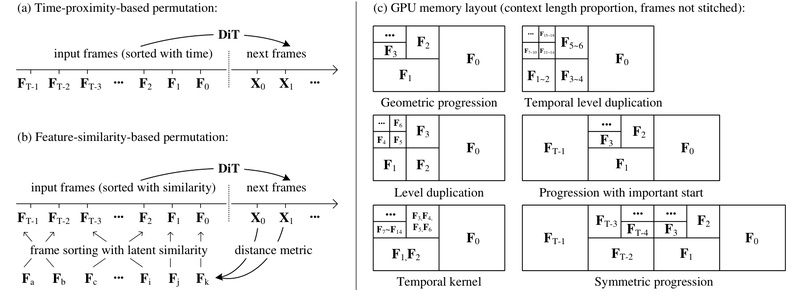
FramePack solves this by compressing the full input history into a constant-size latent representation, regardless of how many frames have been generated. This “frame packing” mechanism ensures that the transformer’s context length remains fixed, making the computational load invariant to video duration. As a result, generating a 5-second clip or a 60-second sequence uses the same per-step resources.
This breakthrough enables long video generation on consumer hardware—tested to work on RTX 3060–5090 GPUs with as little as 6GB VRAM.
Anti-Drifting Sampling for Temporal Coherence
A well-known issue in autoregressive video generation is exposure bias: small errors in early frames compound over time, leading to visual drift, warping, or loss of identity (e.g., a dancer’s pose degrading into noise after 20 seconds).
FramePack introduces an anti-drifting sampling strategy that generates frames in inverted temporal order, starting from pre-established endpoints. By anchoring future states early in the process, the model avoids error accumulation and maintains motion consistency throughout long sequences. This technique significantly improves perceptual quality in extended generations without increasing compute overhead.
Image-Like Workflow with Real-Time Feedback
Unlike black-box video generators that output a final video only after minutes of processing, FramePack provides immediate visual feedback. Since it generates videos section by section (or frame by frame), users see latent previews and partial outputs in real time. This enables rapid iteration—adjust prompts, re-run segments, or halt generation early—making it ideal for experimentation and debugging.
Moreover, the system supports optional acceleration techniques like TeaCache (a caching mechanism that trades minor quality variance for ~30–50% speedup). While useful for prototyping, the project documentation wisely recommends disabling such features for final renders to preserve output integrity.
Practical Use Cases for Teams and Individuals
FramePack excels in scenarios where consistency, motion richness, and accessibility matter most:
- Character animation from still images: Upload a portrait and describe dynamic motion (“The girl dances gracefully, with clear movements, full of charm”) to animate a character over tens of seconds while preserving identity.
- Local prototyping without cloud dependency: Test video generation ideas on your desktop or laptop without provisioning expensive GPU instances or managing distributed training.
- Fine-tuning existing video models: FramePack is compatible with pre-trained video diffusion backbones. By retraining with its context-packing architecture, teams can improve visual quality through more balanced diffusion schedules and reduced extreme timesteps.
- Creative storytelling and demo generation: Quickly produce narrative clips for pitches, game assets, or social content—all from a single image and a concise motion prompt.
Notably, the project includes a desktop GUI built with Gradio, lowering the barrier for non-engineers to experiment with the technology.
Getting Started: Safe, Simple, and Verified
FramePack prioritizes user safety and ease of use. The official repository is the only legitimate source—the maintainers explicitly warn against numerous fake domains (e.g., framepack.ai, framepack.co) that attempt to impersonate the project.
Installation Options
- Windows users: Download the one-click package (includes CUDA 12.6 and PyTorch 2.6). Run
update.batto ensure you’re on the latest version, thenrun.batto launch the GUI. - Linux users: Install dependencies via
pip, then runpython demo_gradio.pyto start the web interface.
Models (over 30GB) are downloaded automatically from Hugging Face upon first use.
Sanity Checks Before Real Work
The project strongly recommends running built-in sanity tests (e.g., generating a 5-second dance video from a provided image and prompt) to verify hardware and software compatibility. Due to the sensitivity of diffusion noise to GPU architecture and drivers, outputs may vary slightly across devices—but should remain semantically consistent.
Limitations and Realistic Expectations
While FramePack dramatically lowers barriers, it’s not magic:
- Generation is progressive: A 60-second video may take hours on a laptop GPU. You’ll see frames appear incrementally, but patience is required for full-length output.
- Hardware requirements are specific: Only RTX 30xx/40xx/50xx GPUs with FP16/BF16 support are tested. GTX 10xx/20xx cards are unsupported.
- Acceleration features affect quality: Tools like TeaCache or quantization can speed up generation but may alter results. Use them for ideation, not final outputs.
- Prompt quality matters: Motion-focused, concise prompts (e.g., “The man dances energetically, leaping mid-air…”) work best. The project provides a ChatGPT prompt template to help users craft effective inputs.
Summary
FramePack redefines what’s possible for on-device video generation. By compressing temporal context, preventing drift, and mimicking the simplicity of image diffusion, it empowers individual developers and small teams to create long, coherent videos without cloud infrastructure or specialized hardware. With its transparent workflow, real-time feedback, and strong safeguards against misinformation (e.g., fake websites), FramePack stands out as a practical, trustworthy tool for the next wave of AI-powered video applications.
If you need to generate motion-rich, temporally stable videos from a single image—and you want to do it on your own machine—FramePack is worth serious consideration.