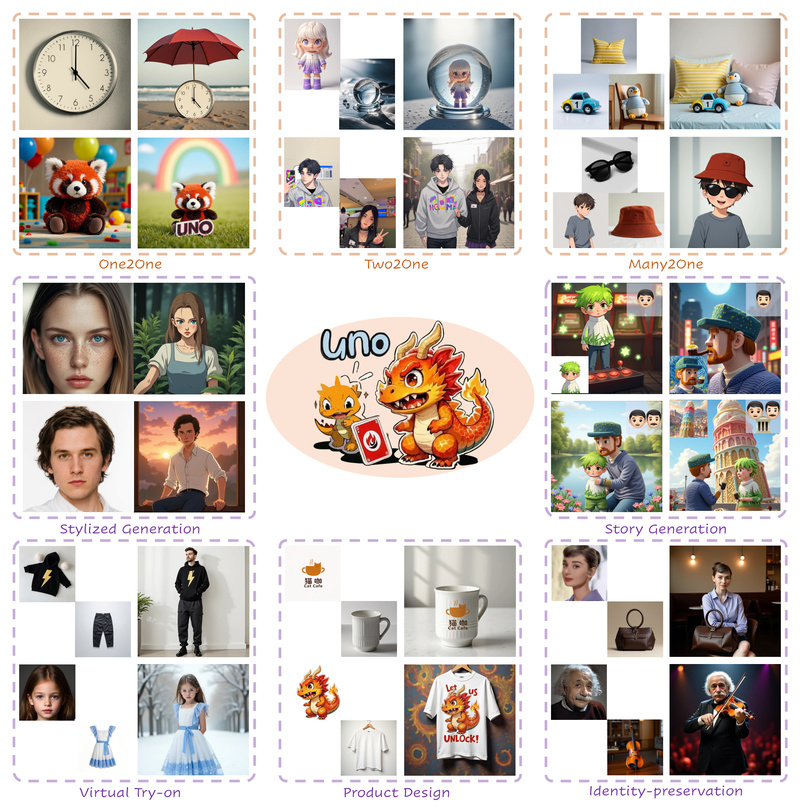
Subject-driven image generation—where users provide one or more reference images of specific objects to guide the creation of new scenes—is a powerful capability for creative professionals, designers, and developers. However, in practice, existing approaches often stumble when scaling beyond a single subject. They either lack the consistency needed to preserve visual identity across generations or fail entirely when asked to compose multiple user-provided subjects into a single coherent image.
Enter Less-to-More Generalization, introduced through the UNO framework by ByteDance’s Intelligent Creation Team. UNO directly addresses the twin bottlenecks of data scalability and subject expansibility by unifying single- and multi-subject generation in a single, highly controllable model. Built on a diffusion transformer architecture, UNO leverages in-context generation capabilities to synthesize high-fidelity, paired data—and then trains a subject-to-image model that maintains remarkable identity consistency, even when combining multiple custom objects into novel scenes.
If you’ve struggled with tools that only handle one subject at a time, or produce inconsistent results when blending user-provided assets, UNO offers a practical path forward—backed by open-source code, pre-trained checkpoints, and a 1M-image dataset.
Why Subject-Driven Generation Needs a New Approach
Traditional subject-driven models excel in narrow scenarios: inserting one logo, one pet, or one product into images. But real-world applications rarely stop there. Imagine an e-commerce platform wanting to showcase a customer’s custom sneaker and hat together on a model, or a game designer placing a player’s avatar alongside their weapon and pet in a fantasy environment. These are multi-subject tasks—and most existing models either can’t handle them or produce outputs where one or both subjects lose recognizability.
Two core problems persist:
- Data scarcity: Curating high-quality, aligned datasets with multiple subjects is labor-intensive and doesn’t scale.
- Architectural rigidity: Models trained only on single-subject data lack the mechanisms to attend to and preserve multiple distinct visual identities simultaneously.
UNO tackles both issues head-on. Instead of relying solely on manually collected data, it introduces a highly consistent in-context data synthesis pipeline that automatically generates multi-subject training pairs using the intrinsic capabilities of diffusion transformers. This synthetic data ensures robust learning without manual annotation bottlenecks.
What Makes UNO Different: Core Technical Innovations
UNO isn’t just another fine-tuned diffusion model. It incorporates several key innovations that enable its “less-to-more” generalization:
Unified Single- and Multi-Subject Support
Unlike prior work that requires separate models or complex pipelines for single vs. multi-subject generation, UNO operates within a single architecture. This simplifies deployment and ensures consistent behavior whether you’re inserting one object or three.
Progressive Cross-Modal Alignment
To bridge the gap between visual references and text prompts, UNO uses a progressive alignment strategy during training. This aligns image features and textual semantics step-by-step across diffusion timesteps, ensuring that both the appearance and contextual role of each subject are preserved.
Universal Rotary Position Embedding
Handling arbitrary numbers of input images—and their spatial relationships—requires a flexible positional encoding scheme. UNO’s universal rotary position embedding generalizes across varying input counts and resolutions, supporting dynamic compositions without retraining.
Practical Efficiency for Real-World Use
UNO is designed with practitioners in mind. With FP8 precision and model offloading, inference runs on consumer GPUs with as little as ~16GB VRAM—achieving end-to-end generation in under a minute on an RTX 3090. This makes experimentation and integration feasible without enterprise-grade hardware.
Real-World Applications: Where UNO Shines
UNO’s strength lies in its controllability and consistency. Here are a few scenarios where it delivers tangible value:
- Brand Customization: Place a company logo on multiple products (e.g., mugs, T-shirts, packaging) while preserving logo fidelity across varied lighting, angles, and materials.
- Personalized Content Creation: Generate scenes featuring a user’s custom figurine inside a crystal ball, with both objects retaining their distinctive appearances.
- E-Commerce Prototyping: Show how a customer’s uploaded furniture item would look in different room settings, possibly alongside other user-provided decor items.
- Creative Design Exploration: Combine any number of reference objects—say, a vintage clock and a sun umbrella—into a beach scene described by a text prompt, with high visual faithfulness.
Thanks to training on a multi-scale dataset, UNO handles diverse aspect ratios and resolutions (e.g., 512, 568, 704 pixels) without degradation, offering flexibility for various output formats.
Getting Started: A Practical Workflow
Adopting UNO is straightforward for developers and researchers:
-
Installation: Create a Python 3.10–3.12 environment and install via
pip install -e .(for inference) orpip install -e .[train](for training). -
Model Setup: Checkpoints for FLUX.1, CLIP, T5, and UNO itself are automatically downloaded via Hugging Face Hub—or you can specify local paths if you already have them.
-
Inference: Run a single command with your text prompt and one or more reference images:
python inference.py --prompt "A clock on the beach is under a red sun umbrella" --image_paths "assets/clock.png" --width 704 --height 704
For two subjects:
python inference.py --prompt "The figurine is in the crystal ball" --image_paths "assets/figurine.png" "assets/crystal_ball.png" --width 704 --height 704
-
Experiment Faster: Launch the included Gradio demo with
python app.py --offload --name flux-dev-fp8for a browser-based interface. -
Evaluate & Extend: Use the provided DreamBench evaluation scripts or train on the open-sourced UNO-1M dataset (~1 million paired images) for custom adaptations.
Limitations and Considerations
While UNO represents a significant step forward, it’s important to understand its boundaries:
- Domain Generalization: UNO excels in subject-driven tasks but may struggle with out-of-distribution concepts not well-represented in its training data.
- Prompt Sensitivity: Multi-subject generation benefits from clear, descriptive prompts that specify relationships between objects (e.g., “on,” “inside,” “next to”).
- Licensing Compliance: UNO builds on base models (e.g., FLUX.1, CLIP) that carry their own license terms. Users must adhere to those terms and use the tool responsibly, especially in commercial contexts.
- Research Focus: The project is released for academic and responsible use under Apache 2.0. While production-ready in many ways, ongoing improvements (e.g., enhanced generalization) are in development.
Summary
Less-to-More Generalization via UNO solves a critical gap in controllable image synthesis: the ability to reliably generate scenes with one or many user-provided subjects, while preserving visual identity and enabling creative flexibility. By unifying data synthesis, architecture design, and efficient inference, UNO offers a practical, open-source solution for developers, researchers, and creatives who need more than what single-subject generators can provide. With accessible hardware requirements, clear documentation, and a permissively licensed codebase, it’s a compelling choice for anyone building the next generation of personalized visual content tools.