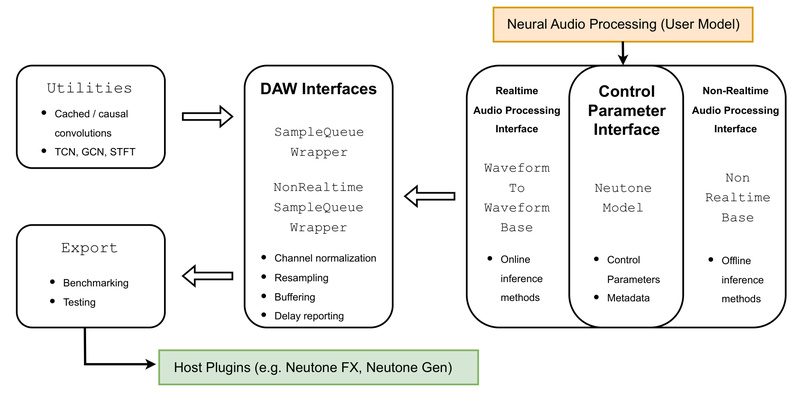
Bringing neural audio models from research notebooks into real-world creative environments has long been a bottleneck for AI audio developers. Most digital audio workstations (DAWs)—like Ableton Live, Logic Pro, or Reaper—require audio plugins built with C++ and frameworks like JUCE, a steep barrier for researchers and developers who work primarily in Python with PyTorch. The Neutone SDK solves this problem by offering a clean, open-source Python framework that wraps your PyTorch-based audio models and deploys them directly into any DAW via the free Neutone FX plugin, with no C++ required.
Developed with researchers, educators, musicians, and startups in mind, Neutone SDK handles the gritty details of real-time audio processing—variable buffer sizes, sample rate mismatches, channel conversions, and latency compensation—so you can focus entirely on your model’s architecture and creative potential. Whether you’re building neural distortion effects, timbre transfer tools, or generative audio synthesizers, Neutone lets you go from prototype to in-DAW plugin in under a day.
Why Neutone SDK? Bridging the Gap Between AI Research and Audio Production
Traditional audio plugin development demands deep expertise in real-time C++ systems, memory management, and platform-specific audio APIs. For AI-focused creators, this is not only time-consuming but often unnecessary: the core innovation lies in the neural model, not the plugin wrapper.
Neutone SDK flips this paradigm. By providing a model-agnostic Python interface, it abstracts away the complexities of DAW integration while preserving full control over your PyTorch logic. You write your model in familiar Python, define a few metadata methods, and export it as a .nm file. That’s it—your model loads instantly into Neutone FX and runs in real time inside your DAW, with automatic handling of audio I/O, parameter modulation, and performance constraints.
This dramatically lowers the barrier to entry: no more weeks spent learning JUCE. Just pure PyTorch, wrapped in minutes.
Key Features Designed for Real-World Audio AI
Seamless Real-Time Compatibility
Neutone SDK ensures your model runs smoothly in any DAW environment by automatically managing:
- Variable buffer sizes: Your model may expect fixed input lengths (e.g., 2048 samples), but DAWs use buffers ranging from 32 to 8192 samples. Neutone handles this via internal buffering and FIFO queues.
- Sample rate conversion: If your model is trained at 48 kHz but the DAW runs at 44.1 kHz, Neutone converts on the fly without breaking real-time performance.
- Stereo/mono handling: Define whether your model expects mono or stereo input, and Neutone auto-converts signals without extra code.
Built-In Latency Compensation
Many neural audio models introduce inherent delay—for example, due to look-ahead buffers or convolutional padding. Neutone SDK requires you to report your model’s delay in samples via calc_model_delay_samples(). The host plugin then compensates automatically, keeping wet and dry signals perfectly aligned—a critical feature for professional audio workflows.
Real-Time Control Parameters
Neutone supports up to four user-adjustable knobs (e.g., “drive,” “tone,” “blend”) that feed into your model during inference. These come in as tensors at sample-level granularity, but are averaged per buffer by default—though you can override this behavior if your model supports per-sample modulation.
Python-First Validation and Export
The save_neutone_model() function doesn’t just serialize your model—it runs a series of validation checks to ensure TorchScript compatibility and correct I/O behavior before generating the .nm plugin file. This safety net catches common deployment errors early.
Who Should Use Neutone SDK?
Neutone is ideal for:
- AI audio researchers who want their models tested in real musical contexts.
- Educators demonstrating neural audio concepts in live DAW sessions.
- Indie developers and startups prototyping commercial audio effects without hiring C++ engineers.
- Electronic musicians and sound designers experimenting with custom neural processors in their creative flow.
Common use cases include:
- Neural effect emulation: Re-creating analog distortion, reverb, or compression using trained networks (e.g., TCN or DDSP models).
- Timbre transfer: Transforming the sonic character of one instrument into another (e.g., turning violin into synth).
- Audio reconstruction and enhancement: Denoising, bandwidth extension, or inpainting using models like RAVE or Demucs.
- Generative sound design: Creating new textures or rhythms via latent-space manipulation.
Getting Started: Wrap, Export, and Play
The workflow is intentionally minimal:
- Subclass
WaveformToWaveformBase: Implement your PyTorch model’s forward logic insidedo_forward_pass(). - Define I/O behavior: Specify whether your model uses mono/stereo and preferred sample rates or buffer sizes (or leave empty for full flexibility).
- Add parameters (optional): Declare knobs via
get_neutone_parameters()and unpack them indo_forward_pass. - Export with validation: Call
save_neutone_model()to generate a.nmfile. - Load into Neutone FX: Install the VST3/AU plugin from neutone.space, click “Load Your Own,” and select your file.
For example, even a simple clipper model can become a DAW-ready effect in under 30 lines of Python—no C++, no build systems, no deployment headaches.
Benchmarking and Profiling: Confidence Before Release
Before sharing your model—or using it in a live set—you’ll want to verify its real-time performance. Neutone SDK includes three CLI tools:
benchmark-speed: Measures inference time across common DAW settings (e.g., 44.1/48 kHz, buffer sizes 128–2048) and reports 1/RTF (inverse real-time factor). A value >1 means your model can run in real time on that machine.benchmark-latency: Computes total delay (buffering + model-induced) for each (sample rate, buffer size) combo, helping you optimize for low-latency scenarios.profile: Uses PyTorch’s profiler to break down CPU time and memory usage per operation—perfect for identifying bottlenecks in complex models.
These tools ensure your model behaves predictably before it ever touches a musician’s session.
Current Limitations to Keep in Mind
While Neutone SDK is robust, it’s still evolving. Known constraints include:
- No M1/M2 Apple Silicon acceleration (models run on CPU only for now).
- TorchScript conversion issues may arise with highly dynamic or control-flow-heavy models.
- Lookahead buffers aren’t natively supported yet—you’ll need custom code if your model requires future samples.
- Metadata (e.g., descriptions, tags) isn’t displayed when loading models locally—only in the public Neutone library.
The team encourages testing with the provided examples (Clipper, Overdrive, DDSP, RAVE) to understand these boundaries.
Share Your Models with the Community
Neutone isn’t just a tool—it’s a platform for collaboration. Once you’ve built something useful, you can submit it to the public Neutone model library, making it instantly available to creators worldwide.
Submission requires:
- A descriptive name, author list, short/long descriptions, technical notes, tags, and citations.
- A valid
.nmfile exported via the SDK.
Just open a GitHub issue with your model and context. Approved models appear in the Neutone FX plugin’s built-in browser, fostering a shared ecosystem of neural audio innovation.
Summary
The Neutone SDK removes the last mile between neural audio research and real-world creative application. By letting you deploy PyTorch models directly into DAWs with pure Python—handling all real-time audio plumbing automatically—it empowers a new generation of audio AI practitioners to focus on what matters: building expressive, novel, and musically useful models. Whether you’re emulating vintage hardware, transferring timbres, or generating sound from scratch, Neutone gives you a production-ready path without leaving your Python environment.