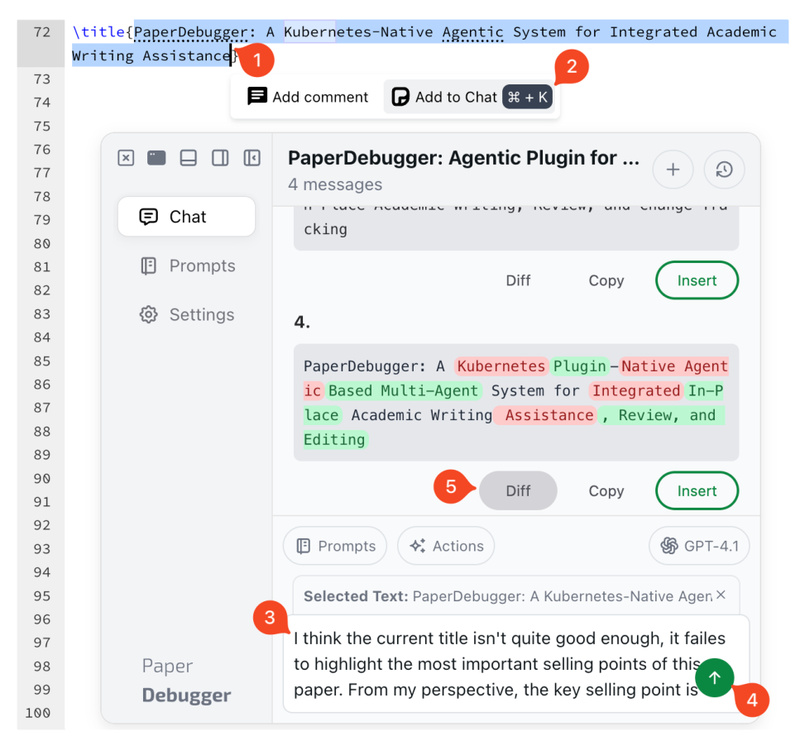
Academic writing is a deeply iterative and often fragmented process. Researchers routinely juggle LaTeX editors like Overleaf, reference managers, peer feedback, and AI assistants running in separate browser tabs—creating friction, breaking focus, and slowing down progress. PaperDebugger directly addresses this workflow fragmentation by embedding a multi-agent AI assistant inside the Overleaf editor itself, enabling context-aware critique, research assistance, and structured revision without ever leaving your document.
Built as a Chrome extension and backed by a Kubernetes-native orchestration layer, PaperDebugger brings the full academic cycle—Research, Critique, Revision—into the writing environment through a plugin-based architecture. It reads your LaTeX project state in real time, generates intelligent suggestions, and supports one-click insertion or commenting, all while never modifying your original content. This in-editor, agent-driven approach represents a significant shift from traditional chat-based AI tools that lack document awareness or version context.
Why Traditional AI Assistants Fall Short for Academic Writing
Most AI writing assistants operate externally: you copy-paste text into a chat window, receive generic feedback, and manually re-integrate edits. This method fails to capture structural context (e.g., section roles, citation integrity, mathematical notation) and ignores revision history—critical elements in scholarly communication. Worse, it forces constant context switching, which disrupts deep work.
PaperDebugger solves this by establishing bidirectional synchronization with Overleaf, enabling agents to reason over your actual document structure, cursor position, and editing timeline. The system leverages the Model Context Protocol (MCP) to orchestrate specialized agents that perform tasks like literature lookup, citation validation, and simulated peer review—all grounded in your current draft.
Key Features That Enable Smarter, Safer Writing
In-Editor AI Chat with Full Document Awareness
Unlike generic chatbots, PaperDebugger’s assistant understands your LaTeX project as a structured artifact. Ask questions like “How can I strengthen the motivation in Section 2?” or “Suggest related work for our method,” and receive answers tailored to your specific content.
One-Click Insertion and Comment Generation
Responses aren’t just text—they’re actionable. Use “Instant Insert” to place revised paragraphs directly into your document, or generate editorial comments (like those from peer reviewers) that appear as Overleaf annotations, preserving your original text while flagging areas for improvement.
Multi-Agent Workflows via MCP Orchestration
Behind the scenes, PaperDebugger activates specialized agents based on your request:
- A literature agent fetches and summarizes relevant papers.
- A review agent mimics conference reviewer feedback.
- A revision agent proposes clarity, tone, or structure improvements.
These agents run in parallel and coordinate through the MCP toolchain, enabling complex, multi-step reasoning without user orchestration.
Privacy-First and Non-Destructive by Design
Your project remains untouched. PaperDebugger only reads your content to generate suggestions—it never auto-saves or alters your files. All data handling follows secure state management practices, making it suitable for sensitive or unpublished research.
Extensible Prompt Library
Pre-built prompt templates support common academic tasks: abstract refinement, methodology clarification, rebuttal drafting, and more. Users can also create custom prompts to match their domain-specific needs.
Ideal Use Cases for Researchers and Technical Writers
PaperDebugger shines in scenarios where precision, context, and efficiency matter most:
- Pre-submission polishing: Get reviewer-style critiques on logic flow, contribution clarity, or technical soundness before sending to a journal.
- Iterative drafting: Refine arguments or restructure sections with AI suggestions that respect LaTeX formatting and equation environments.
- Collaborative writing: Use AI-generated comments to guide co-authors on specific edits without overwriting shared content.
- Literature integration: Instantly locate and cite relevant works based on your current claims, reducing manual database searches.
Whether you’re a graduate student drafting your first paper or a seasoned researcher managing multiple manuscripts, PaperDebugger reduces cognitive load by delivering the right assistance at the right time—inside your writing environment.
How to Get Started in Under Two Minutes
Getting started is straightforward for most users:
- Install the PaperDebugger extension from the Chrome Web Store.
- Open any project in Overleaf.
- Click the PaperDebugger icon in the top-left corner of the editor.
- Start chatting—ask for edits, reviews, or research help directly.
For advanced users or institutions requiring data control, PaperDebugger supports self-hosted backends. By enabling Developer Tools in the extension settings (tap the version number five times), you can point the client to your own MCP-compliant server endpoint.
Limitations and Practical Considerations
While powerful, PaperDebugger has current constraints worth noting:
- Platform dependency: It only works with Overleaf through the Chrome browser, due to its extension-based architecture.
- AI backend reliance: The default setup uses external APIs (e.g., OpenAI), which may affect latency, cost, or compliance in regulated environments.
- No auto-editing: By design, it never modifies your document automatically—users must approve all insertions or comments, which ensures safety but requires manual acceptance.
- Ongoing reliability improvements: As noted in the project’s GitHub, the team is actively addressing stability issues, particularly around long-running sessions.
These limitations reflect intentional trade-offs favoring user control, privacy, and editor integration over full automation.
Summary
PaperDebugger redefines academic AI assistance by moving intelligence into the writing environment—not alongside it. By combining in-editor presence, multi-agent reasoning, and strict non-modification policies, it delivers contextually grounded, actionable support that respects both scholarly rigor and user autonomy. For researchers tired of context-switching between tools, it offers a streamlined path to higher-quality drafts, faster revisions, and more confident submissions—all without leaving Overleaf.