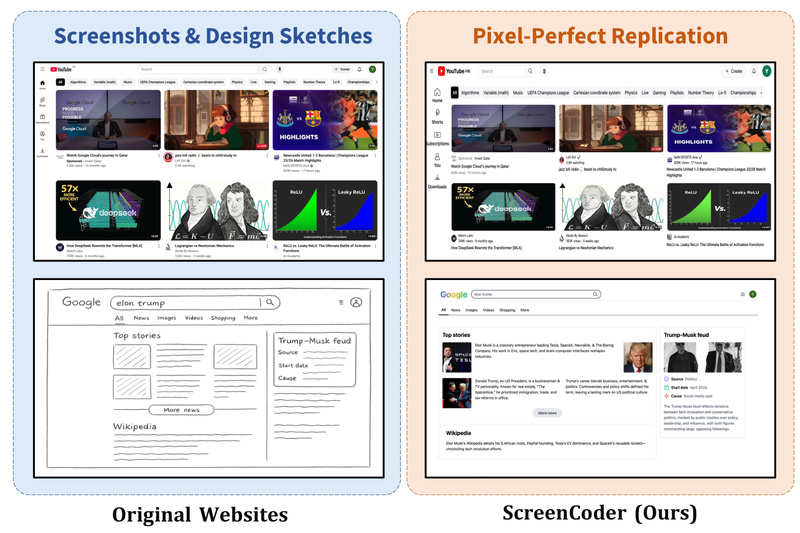
Transforming visual UI designs into functional front-end code has long been a bottleneck in software development. Designers craft mockups in tools like Figma or Adobe XD, but developers must manually interpret and reimplement these designs in HTML/CSS—a process that’s time-consuming, error-prone, and often misaligned. ScreenCoder directly addresses this pain point by automatically converting any UI screenshot or design draft into clean, editable, and production-ready HTML/CSS code. Built on a modular multi-agent architecture, it combines visual understanding, structured layout planning, and adaptive code synthesis to bridge the gap between design and development—no manual translation required.
A Modular Workflow Built for Interpretability and Robustness
Unlike end-to-end black-box models that treat UI-to-code as a monolithic task, ScreenCoder decomposes the process into three clear, interpretable stages:
Grounding: Seeing the UI Like a Developer
The grounding agent leverages a vision-language model to detect and semantically label UI components—buttons, text fields, images, headers—from a raw screenshot. This step ensures that the system understands not just what elements exist, but what they mean in the context of front-end development.
Planning: Structuring Layouts with Engineering Priors
Once elements are identified, the planning agent organizes them into a hierarchical structure (e.g., containers, sections, grids) using front-end best practices. This stage encodes spatial relationships and layout logic—critical for responsive, maintainable code—rather than just pixel coordinates.
Generation: Producing Clean, Editable HTML/CSS
Finally, the generation agent synthesizes the actual code using adaptive prompting with large language models (LLMs). The output is semantic, well-indented HTML with corresponding CSS—ready to be copied, customized, and deployed without cleanup.
This modular design not only improves code fidelity and layout accuracy but also makes the system easier to debug, extend, and trust—key advantages for real-world adoption.
Practical Use Cases That Deliver Immediate Value
ScreenCoder excels in scenarios where speed, accuracy, and accessibility matter:
- Rapid Prototyping: Turn hand-drawn sketches or high-fidelity mockups into working UI templates in seconds.
- Design Handoff Automation: Eliminate back-and-forth between designers and developers by generating code directly from Figma exports or website screenshots.
- Empowering Non-Coders: Product managers, UX researchers, or junior designers can generate functional front-end code without writing a single line.
- Customizable Output: The generated HTML/CSS is fully editable, allowing users to tweak styles, restructure layouts, or integrate into larger projects.
Whether you’re iterating on a landing page or building a design system library, ScreenCoder reduces friction from concept to implementation.
Getting Started: Simple Setup, Flexible Backend
Using ScreenCoder is straightforward:
- Input any UI screenshot (PNG, JPG, etc.).
- Run the pipeline via
python main.py—or step through detection, planning, and generation scripts individually for fine-grained control. - Receive final HTML/CSS with actual cropped images from the original screenshot, not placeholders.
The system supports multiple LLM backends—including Doubao, Qwen, GPT, and Gemini—so you can choose based on availability, cost, or performance. API keys are managed via simple text files (e.g., gpt_api.txt), and a local demo (app.py) lets you test the interface without cloud dependencies.
For evaluation or research, the team also released ScreenBench, a high-quality dataset of 1,000 real-world web screenshots paired with ground-truth HTML, hosted on Hugging Face.
Limitations and Realistic Expectations
While powerful, ScreenCoder has practical boundaries:
- It targets static HTML/CSS only—no JavaScript interactivity or framework-specific syntax (e.g., React, Vue).
- Performance is best on clear, structured UIs; highly abstract, overlapping, or low-resolution designs may reduce accuracy.
- The pipeline relies on external LLM APIs, requiring valid keys and network access (though open-weight models can be integrated with effort).
- The fine-tuned vision-language model is open-sourced, but setting up the full training or reinforcement learning pipeline involves non-trivial infrastructure.
These constraints make ScreenCoder ideal for layout-focused tasks rather than full-stack application generation—but within its scope, it delivers exceptional fidelity.
State-of-the-Art Results and Community Impact
ScreenCoder sets new benchmarks in visual-to-code generation, outperforming prior methods in layout accuracy, structural coherence, and code correctness. Its modular design, combined with a scalable synthetic data engine that auto-generates image-code pairs, enables continuous improvement through fine-tuning and reinforcement learning.
By open-sourcing both code and data, the team empowers developers, researchers, and educators to experiment, evaluate, and build upon their framework—accelerating progress in multimodal code generation.
Summary
ScreenCoder redefines how teams move from design to code. By automating UI-to-HTML/CSS conversion with a transparent, modular, and high-fidelity pipeline, it saves hours of manual work while producing production-ready output. For anyone involved in front-end development, design systems, or rapid prototyping, ScreenCoder offers a practical, accessible, and state-of-the-art solution to a decades-old workflow bottleneck.