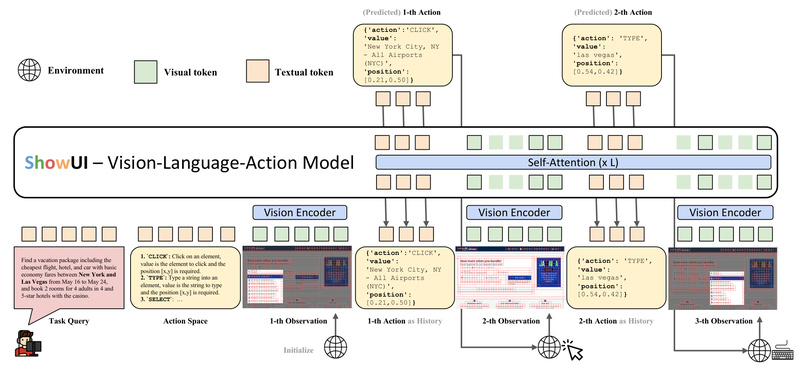
In today’s digital workflows, automating interactions with graphical user interfaces (GUIs)—whether on websites, mobile apps, or desktop software—is a high-value yet challenging problem. Traditional GUI agents often depend on structured metadata like HTML or accessibility trees, limiting their applicability to environments where such data is unavailable, proprietary, or incomplete. Enter ShowUI: an open-source, end-to-end, lightweight Vision-Language-Action (VLA) model that perceives GUIs exactly as humans do—through raw screenshots—and responds with precise actions.
Developed by researchers at Show Lab (National University of Singapore) and Microsoft, ShowUI rethinks GUI automation by treating it as a unified visual reasoning and action generation task. Unlike black-box API-based agents, ShowUI runs locally, requires no privileged access to UI internals, and delivers strong zero-shot performance with just a 2-billion-parameter architecture. This makes it ideal for developers, researchers, and engineers seeking transparent, deployable, and efficient GUI agents.
Why ShowUI Stands Out: Core Technical Innovations
UI-Guided Visual Token Selection: Smarter Vision Processing
GUI screenshots contain abundant visual redundancy—buttons, icons, and text fields often repeat or align predictably. ShowUI introduces UI-Guided Visual Token Selection, a novel technique that models the screenshot as a UI-connected graph to identify and prune redundant visual tokens during self-attention. This reduces visual token count by 33%, accelerates inference by 1.4×, and lowers memory usage—without sacrificing accuracy. For practitioners, this means faster response times and smoother deployment on consumer-grade hardware.
Interleaved Vision-Language-Action Streaming: Unified Task Handling
GUI interaction often involves sequences: “click ‘Settings’, then toggle ‘Dark Mode’.” ShowUI’s Interleaved Vision-Language-Action Streaming architecture seamlessly integrates visual inputs, natural language instructions, and action outputs into a single coherent stream. This design efficiently handles multi-turn navigation, pairs queries with corresponding screenshots, and maintains action history—crucial for complex workflows across web, mobile, or desktop interfaces.
High-Quality, Balanced Instruction Data
Instead of scaling up with noisy, imbalanced web data, ShowUI is trained on a carefully curated 256K-sample dataset of GUI instruction-action pairs. A strategic resampling strategy ensures balanced representation across task types (e.g., clicking, typing, scrolling), leading to more reliable generalization. The result? A lean model that outperforms larger, data-hungry alternatives in GUI-specific tasks.
Real-World Applications: Where ShowUI Delivers Value
ShowUI excels in scenarios where traditional agents fail:
- Automating Proprietary or Closed Applications: Since it operates purely from screenshots, ShowUI works on any GUI—even those without accessible HTML or accessibility APIs (e.g., legacy enterprise software, video games, or protected mobile apps).
- Cross-Platform Navigation: Validated on Mind2Web (web), AITW (Android), and MiniWob (browser-based tasks), ShowUI demonstrates consistent grounding and action accuracy across diverse digital environments.
- Local PC Control (“Computer Use”): Integrated into the OOTB (Out-of-the-Box) framework, ShowUI can control your actual computer—clicking buttons, filling forms, or navigating menus—entirely offline.
- Zero-Shot UI Grounding: With 75.1% accuracy in identifying UI elements from natural language queries without task-specific fine-tuning, ShowUI serves as a powerful foundation for rapid prototyping.
Getting Started: Practical Adoption Paths
ShowUI is designed for real-world usability:
- Run Locally: Launch a Gradio demo with
python3 api.py—no GPU required. For faster inference, use vLLM with multi-GPU support. - Fine-Tune Your Own Agent: Built on Qwen2.5-VL, ShowUI supports efficient fine-tuning via QLoRA, DeepSpeed, and FlashAttention2. Training scripts include support for mixed datasets and interleaved data streaming.
- Optimize for Edge Deployment: Apply int8 quantization to shrink the model footprint while preserving performance.
- Custom Data Annotation: Use the provided
recaption.ipynbscript to refine or generate new instruction-action pairs with GPT-4o.
The codebase is open, well-documented, and actively maintained—with recent integrations for API serving, iterative grounding refinement, and OOTB desktop control.
Limitations and Considerations
While ShowUI is powerful for its niche, it’s not a general-purpose multimodal model. Its strengths are intentionally focused on GUI interaction, not broad visual question answering or open-world reasoning. The 2B parameter size keeps it lightweight but means it may require fine-tuning for highly specialized or dynamic UIs (e.g., real-time dashboards with animated elements). Additionally, while zero-shot grounding is strong at 75.1%, mission-critical applications may still benefit from task-specific adaptation.
Nonetheless, for teams building automated UI testers, accessibility assistants, or workflow automation bots, ShowUI offers a rare combination: open-source transparency, local execution, screenshot-only input, and competitive performance—all in a compact package.
Summary
ShowUI redefines what’s possible for GUI automation by grounding AI actions in visual perception, not privileged metadata. Its innovations in token efficiency, unified streaming architecture, and high-quality data curation make it a standout choice for developers seeking a practical, deployable, and human-like GUI agent. Whether you’re automating web tasks, controlling desktop apps, or researching vision-language-action systems, ShowUI provides a robust, open foundation to build upon—without dependency on closed APIs or massive compute.