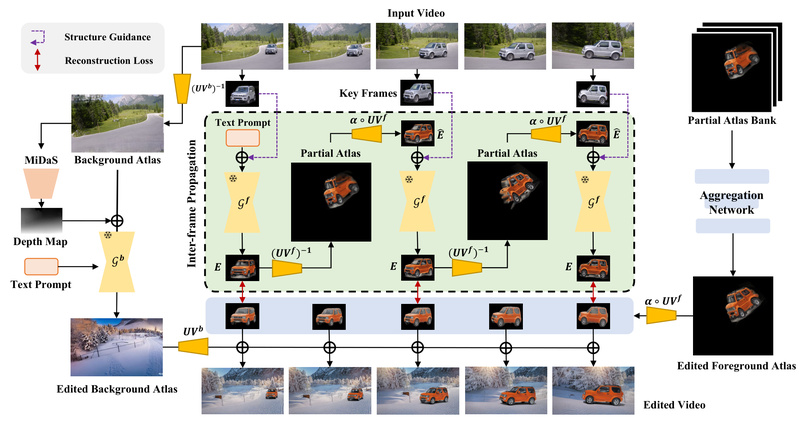
Editing objects in existing videos while preserving their appearance across time has long been a challenge for diffusion-based models. While these models excel at generating realistic images or even full videos from scratch, they often fail when asked to modify only specific elements—like changing a car’s color or replacing a background—without introducing flickering, warping, or visual inconsistencies between frames. This limitation has hindered their practical adoption in real-world video editing workflows.
StableVideo directly addresses this problem. Introduced in the ICCV 2023 paper “StableVideo: Text-driven Consistency-aware Diffusion Video Editing,” this method enables precise, text-guided edits to existing videos while maintaining strong temporal consistency. By leveraging a novel inter-frame propagation mechanism grounded in layered representations, StableVideo ensures that edited objects look coherent from one frame to the next—making it a compelling solution for teams working on visual content creation, VFX prototyping, or video-based research.
Why Temporal Consistency Matters in Video Editing
Traditional diffusion models treat each video frame independently during editing. As a result, even minor variations in noise sampling or conditioning can cause noticeable jitter or “flicker” in the edited object’s appearance over time. For professional or even semi-professional use, this is unacceptable.
StableVideo solves this by explicitly modeling temporal dependencies. Instead of editing frames in isolation, it propagates appearance information from one frame to the next using a layered representation strategy. This allows the model to “remember” how an object looked in previous frames and enforce continuity during generation—dramatically reducing artifacts and producing visually stable results.
Core Capabilities
Text-Driven Editing
Users describe desired changes using natural language prompts (e.g., “turn the red car blue” or “add snow to the beach scene”). StableVideo interprets these instructions and applies them only to the relevant regions, leaving the rest of the video untouched. This makes it highly intuitive for non-experts while offering fine-grained control for advanced users.
Inter-Frame Propagation
The heart of StableVideo lies in its propagation mechanism. By transferring latent appearance features across consecutive frames within a diffusion framework, it ensures that edits remain consistent without requiring explicit optical flow or motion estimation. This approach is both computationally efficient and robust to complex motion patterns.
Layered Representation Handling
StableVideo decomposes each frame into foreground and background layers using precomputed atlases (derived from methods like NLA). This segmentation allows the model to isolate editable regions and apply changes selectively, preserving static backgrounds and dynamic objects alike with high fidelity.
Practical Use Cases
StableVideo is particularly valuable in scenarios where re-generating an entire video is impractical or unnecessary. Consider the following examples:
- Content Creators: Modify product colors or clothing in promotional videos without reshooting.
- Visual Effects (VFX) Teams: Rapidly prototype object replacements or environmental changes during pre-visualization.
- Researchers: Explore controllable video manipulation for datasets or human-perception studies.
- Designers: Test multiple visual variants (e.g., different vehicle liveries or seasonal settings) from a single source video.
Because it edits existing footage rather than synthesizing new video from scratch, StableVideo reduces compute time, preserves original camera motion, and maintains scene authenticity—key advantages over full video generation approaches.
Getting Started
StableVideo is designed for users with basic command-line proficiency and access to a GPU. Setup involves straightforward steps:
- Clone the repository:
git clone https https://github.com/rese1f/StableVideo.git
- Create a Python environment and install dependencies:
conda create -n stablevideo python=3.11
pip install -r requirements.txt
- (Optional) Install
xformersfor reduced VRAM usage. - Download pretrained models and example video atlases (provided via Hugging Face links in the repository).
- Launch the Gradio-based interface:
python app.py
Once running, users can load a video atlas, define a text prompt, adjust the editable mask if needed, and generate a consistent edited video with a single click. Output videos are saved in the ./log directory.
System Requirements and Current Limitations
StableVideo’s VRAM consumption varies based on optimization settings:
- Float32: ~29 GB
- AMP (Automatic Mixed Precision): ~23 GB
- AMP + CPU offloading: ~17 GB
- AMP + CPU + xformers: ~14 GB
These figures assume default resolution settings in app.py. While the tool is accessible on high-end consumer GPUs (e.g., 24 GB VRAM cards with optimizations), it may be prohibitive on lower-end hardware.
Additionally, StableVideo currently requires preprocessed video atlases—structured folders of extracted frames and foreground masks—typically generated using the NLA (Neural Layered Atlas) pipeline. This adds a preprocessing step not handled automatically in the main interface. Users should also be aware of occasional UI glitches in Gradio, such as mask display mismatches, which may require restarting the app.
Despite these constraints, the trade-off is a highly controllable, consistency-aware editing experience unmatched by many contemporary methods.
Summary
StableVideo bridges a critical gap in diffusion-based video editing: the ability to make precise, text-guided changes to real-world videos while maintaining visual consistency over time. By integrating inter-frame propagation and layered representations into a diffusion framework, it delivers professional-grade stability without sacrificing user-friendly text control. For teams seeking an efficient, controllable tool for object-level video manipulation, StableVideo offers a compelling blend of innovation and practicality.