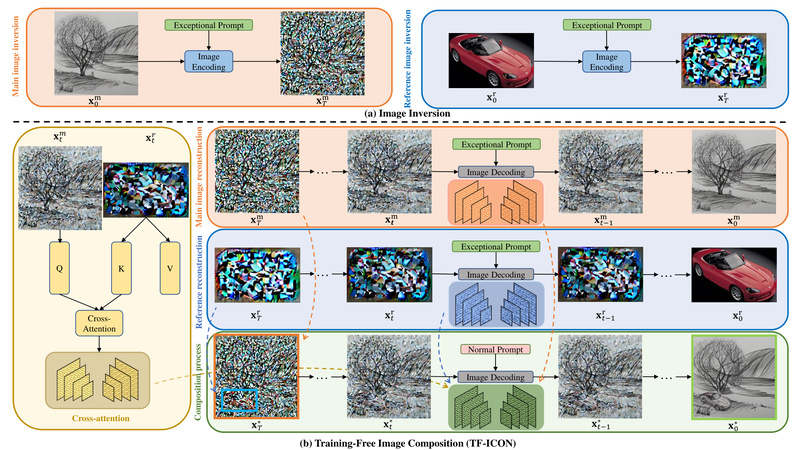
Image composition—seamlessly inserting a user-provided object into a new visual context—is a long-standing challenge in computer vision and generative AI. Traditional diffusion-based approaches often require costly per-instance optimization, fine-tuning on custom datasets, or complex inversion pipelines, which can degrade the rich generative priors embedded in pre-trained models like Stable Diffusion.
Enter TF-ICON (Training-Free Image COmpositioN), a novel framework introduced at ICCV 2023 that enables high-quality, cross-domain image composition without any retraining, fine-tuning, or optimization. By leveraging off-the-shelf text-to-image diffusion models and introducing a clever technique called the exceptional prompt, TF-ICON achieves state-of-the-art results across diverse visual domains—from photorealistic scenes to cartoons, oil paintings, and sketches—while preserving the model’s original capabilities.
This makes TF-ICON especially valuable for practitioners who need flexible, plug-and-play image editing tools that work out of the box, without infrastructure overhead or data curation.
Why TF-ICON Stands Out: No Training Needed, Yet High Quality
Most modern image composition methods rely on adapting diffusion models to specific inputs through techniques like textual inversion, LoRA fine-tuning, or latent optimization. While effective, these approaches are computationally expensive, time-consuming, and risk overfitting or distorting the model’s learned priors.
TF-ICON eliminates these drawbacks entirely. It operates training-free, meaning you can use a standard Stable Diffusion checkpoint (e.g., SD 2.1) as-is—no additional training, no custom datasets, no gradient updates.
The key innovation is the exceptional prompt: a deliberately empty or uninformative text prompt (e.g., an empty string or placeholder) used during the image inversion phase. Surprisingly, this “null” prompt enables more accurate reconstruction of real images into diffusion latents by reducing semantic interference from misleading textual cues. This clean inversion forms the foundation for precise foreground-background blending.
In experiments across CelebA-HQ, COCO, and ImageNet, TF-ICON with the exceptional prompt outperformed existing inversion methods and delivered superior composition quality compared to prior baselines—even when blending objects across vastly different visual styles.
When to Use TF-ICON: Ideal Scenarios
TF-ICON excels in two primary settings:
Cross-Domain Composition
This is where TF-ICON truly shines. Imagine inserting a real photograph of a cat into a hand-drawn cartoon, placing a 3D-rendered car into an oil painting, or integrating a sketch into a photorealistic cityscape. These tasks involve mismatched visual domains (e.g., texture, lighting, abstraction level), which often break conventional compositing pipelines. TF-ICON handles such cases robustly by decoupling style adaptation from object preservation through attention manipulation in the diffusion process.
Same-Domain (Photorealistic) Composition
TF-ICON also works well when both foreground and background are photorealistic—such as placing a person into a new landscape or adding furniture to an interior photo. While less challenging than cross-domain cases, these still benefit from TF-ICON’s training-free efficiency and high fidelity.
In both modes, users simply provide four inputs per composition:
- A background image
- A foreground object
- A segmentation mask of the foreground
- A target placement mask on the background
No additional annotations or model adjustments are needed.
Problems TF-ICON Solves for Practitioners
Practitioners in creative industries, digital content generation, or AI research often face these pain points:
- High computational cost: Per-instance fine-tuning demands GPU hours and engineering effort.
- Model degradation: Fine-tuning on narrow data can weaken a model’s generalization.
- Complex pipelines: Many methods require chained steps—segmentation → inversion → editing → refinement—each introducing failure points.
- Limited domain flexibility: Most tools assume photorealism; few handle artistic styles gracefully.
TF-ICON directly addresses these by offering a single-step, zero-training workflow that:
- Runs with pre-trained models
- Maintains model integrity
- Supports diverse visual domains
- Produces high-quality outputs with minimal input
This makes it ideal for rapid prototyping, batch processing, or integration into larger creative AI systems.
Getting Started with TF-ICON: A Practical Walkthrough
Setting up and running TF-ICON is straightforward for users familiar with Python and diffusion models.
1. Environment Setup
You can use Conda, Pip with a virtual environment, or a global Pip install. The repository provides a tf_icon_env.yaml for Conda, or you can install dependencies via pip install -e ..
2. Download Stable Diffusion Weights
TF-ICON uses Stable Diffusion 2.1 (512×512). Download sd-v2-1_512-ema-pruned.ckpt from Hugging Face and place it in the ./ckpt directory.
3. Prepare Inputs
Organize your data under ./inputs/cross_domain or ./inputs/same_domain. Each case requires four files:
bg.png(background)fg.png(foreground object)fg_mask.png(foreground segmentation)mask_bg_fg.png(target placement region on background)
Ensure the foreground isn’t too small—resolution matters for detail preservation.
4. Run Composition
For cross-domain:
python scripts/main_tf_icon.py --ckpt ckpt/v2-1_512-ema-pruned.ckpt --root ./inputs/cross_domain --domain 'cross' --scale 5 --tau_a 0.4 --tau_b 0.8 --dpm_steps 20 --dpm_order 2 --outdir ./outputs --gpu cuda:0
For same-domain, use --domain 'same' and --scale 2.5.
Key parameters:
--scale: Classifier-free guidance strength (higher for cross-domain)--tau_a,--tau_b: Control attention injection and background preservation--dpm_steps: Sampling steps (20 is a good balance of speed/quality)
Limitations and Practical Considerations
While powerful, TF-ICON isn’t a magic wand. Users should be aware of:
- Hardware requirements: At least 20–23 GB VRAM is recommended. This limits accessibility on consumer GPUs.
- Input quality dependency: Results rely on accurate foreground masks and reasonable foreground resolution. Poor masks lead to artifacts.
- No automatic segmentation: You must provide
fg_mask.png—TF-ICON doesn’t include a built-in segmenter. - Stable Diffusion dependency: Currently tied to SD 2.1; not yet compatible with SDXL or other architectures without modification.
That said, within its design scope, TF-ICON delivers exceptional ease-of-use and quality for training-free composition.
Summary
TF-ICON redefines what’s possible in image composition by proving you don’t need to retrain models to achieve cross-domain blending. Its training-free design, powered by the exceptional prompt and attention-based compositing, offers practitioners a fast, reliable, and high-quality alternative to complex fine-tuning pipelines. Whether you’re generating concept art, building creative tools, or researching generative models, TF-ICON is a compelling choice for seamless image integration—across styles, without compromise.