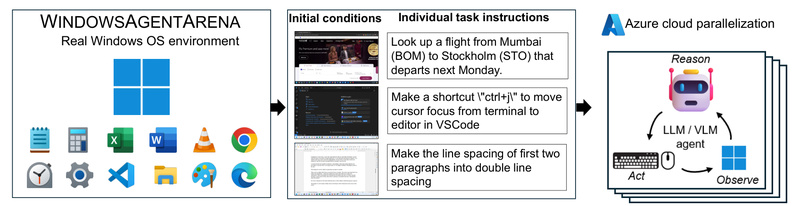
Evaluating AI agents that interact with desktop operating systems has long been hampered by artificial or limited test environments. Most existing benchmarks restrict agents to narrow domains—like web navigation, coding challenges, or text-only reasoning—failing to capture the full complexity of real-world computer use.
Enter Windows Agent Arena (WAA): a scalable, reproducible platform that evaluates multimodal AI agents inside a fully functional Windows 11 environment. Developed by Microsoft, WAA lets agents perform everyday tasks—opening apps, managing files, browsing the web, configuring settings—just like human users do. By grounding evaluation in a real OS with real applications, WAA offers a more realistic, comprehensive, and actionable benchmark for the next generation of desktop AI agents.
Why Traditional Agent Benchmarks Fall Short
Before WAA, researchers and developers faced three critical bottlenecks:
- Narrow scope: Benchmarks often focused on a single modality (e.g., text or HTML) and couldn’t assess how agents reason across visual UIs, application states, and system tools.
- Slow evaluation: Running full task suites could take days due to the sequential, interactive nature of desktop workflows.
- Lack of realism: Simulated or sandboxed environments don’t replicate the unpredictability and diversity of actual Windows usage.
WAA directly addresses all three pain points—delivering a general-purpose, high-fidelity, and fast evaluation pipeline tailored for multimodal OS agents.
Key Strengths That Set WAA Apart
1. Realistic Testing in a True Windows 11 Environment
Unlike synthetic UI simulators, WAA runs agents inside an actual Windows 11 VM preloaded with common software—Microsoft Office, web browsers, file explorers, and more. Agents must interpret pixel-level screen content, parse accessibility trees, and issue precise input commands, just as a human would. This realism ensures that benchmark results reflect true agent capabilities, not just performance in constrained toy environments.
2. Scalable Evaluation in Minutes, Not Days
Thanks to tight integration with Azure Machine Learning, WAA can parallelize hundreds of task evaluations across multiple virtual machines. What used to take days on a single machine can now complete in as little as 20 minutes. This speed dramatically accelerates agent development cycles, enabling rapid iteration and comparison across architectures.
3. Support for Diverse Agent Capabilities
WAA’s 150+ tasks span domains like document editing, system configuration, web research, and file organization. Successfully completing them requires a blend of:
- Planning (breaking down high-level goals into executable steps),
- Screen understanding (interpreting GUI elements via vision or accessibility APIs),
- Tool usage (interacting with native Windows apps and browsers).
This multidimensional evaluation reveals not just whether an agent succeeds, but how it reasons—and where it struggles.
4. Reproducible and Containerized Deployment
WAA packages the entire evaluation stack—including the Windows VM, agent server, and task orchestrator—into Docker containers. This ensures consistent results across local and cloud environments, making experiments reproducible and collaboration seamless.
Ideal Use Cases for Practitioners and Researchers
WAA is especially valuable for:
- AI research teams developing general-purpose desktop agents and needing a standardized, challenging benchmark to validate progress.
- Product engineers building automation tools (e.g., AI copilots for enterprise software) who want to test reliability across real Windows workflows before deployment.
- Academic labs comparing multimodal architectures (e.g., vision-language models vs. accessibility-based parsers) under controlled yet realistic conditions.
- Open-source contributors looking to contribute new tasks or agents to a growing ecosystem of OS-level AI evaluation.
Whether you’re fine-tuning an agent’s screen parsing module or measuring end-to-end task success, WAA provides the infrastructure to do it rigorously and efficiently.
How WAA Solves Real Pain Points in Agent Evaluation
WAA bridges the gap between lab-based agent demos and production-ready reliability. By offering a unified platform that combines realism, scale, and reproducibility, it enables:
- Faster iteration: Parallel cloud execution turns week-long evaluations into lunch-break experiments.
- Broader coverage: Tasks require cross-application reasoning, not just isolated actions.
- Transparent comparison: All agents face the same environment, eliminating “benchmark hacking” through environment-specific shortcuts.
Notably, even the best-performing agent in the WAA paper—Navi—achieves only 19.5% task success, compared to 74.5% for unassisted humans. This gap highlights both the challenge and the opportunity: WAA doesn’t just measure performance—it exposes where next-gen agents need to improve.
Getting Started: A Practical Walkthrough
Running WAA is designed to be straightforward for developers and researchers:
- Prerequisites: Install Docker (with WSL 2 on Windows), Python 3.9, and obtain an OpenAI or Azure OpenAI API key.
- Prepare the environment: Clone the repo, install dependencies, and create a
config.jsonwith your API credentials. - Build the Windows VM: Download the Windows 11 Enterprise Evaluation ISO, place it in the designated folder, and run the automated setup script (
./run-local.sh --prepare-image true). This creates a 30GB “golden image” VM (~20 minutes). - Run evaluations: Launch benchmark runs with prebuilt agents like Navi, which supports multiple screen-understanding backends (e.g., Omniparser, accessibility trees, or OCR+object detection). For best results, use:
./run-local.sh --gpu-enabled true --som-origin mixed-omni --a11y-backend uia
- Bring Your Own Agent (BYOA): WAA welcomes custom agents. Simply implement
predict()andreset()methods in a new agent module, and WAA handles the rest.
For large-scale runs, WAA’s Azure integration lets you deploy dozens of VMs in parallel—ideal for comprehensive benchmarking or hyperparameter sweeps.
Limitations and Considerations
While powerful, WAA has practical constraints to consider:
- Windows dependency: Requires the Windows 11 Enterprise Evaluation ISO (90-day trial, English-only), limiting non-English or non-Windows use cases.
- API access: Agents rely on OpenAI or Azure OpenAI models (e.g., GPT-4V, GPT-4o), incurring usage costs.
- Hardware demands: Local runs need at least 8 GB RAM and 8 CPU cores; KVM acceleration is strongly recommended for performance.
- Task scope: Current tasks focus on general productivity scenarios; specialized domains (e.g., CAD, video editing) aren’t yet covered.
Critically, WAA’s low agent success rates underscore that desktop AI is still early-stage—making the platform not just a benchmark, but a roadmap for future research.
Summary
Windows Agent Arena redefines how we evaluate multimodal AI agents by placing them in a real, diverse, and scalable Windows environment. It solves long-standing challenges in agent benchmarking—narrow scope, slow runs, and unrealistic setups—while providing researchers and developers with the tools to build, test, and compare agents that truly understand and operate on desktop systems. If you’re working on AI that interacts with operating systems, WAA isn’t just useful—it’s essential.