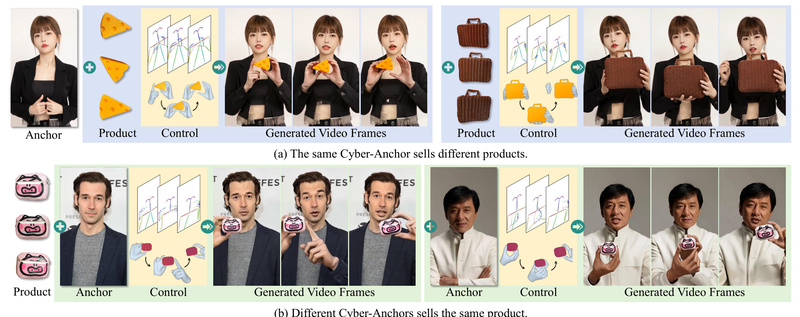
In the fast-evolving world of e-commerce and digital marketing, brands are under constant pressure to produce high-quality, engaging promotional videos—fast and affordably. Traditional methods require filming real people, coordinating logistics, and editing footage, all of which are time-consuming and expensive. What if you could generate a realistic video of a “cyber-anchor” naturally interacting with your product—just from a reference image of a person and a photo of the item—without ever stepping on set?
That’s exactly what AnchorCrafter delivers. Built on a diffusion-based architecture, AnchorCrafter is a cutting-edge system that synthesizes 2D promotional videos featuring a target human and a custom object, with precise control over motion and appearance. Unlike generic pose-guided human video generators, AnchorCrafter is purpose-built for human-object interaction (HOI), making it uniquely suited for product demonstration, virtual influencer content, and scalable ad campaigns.
Why AnchorCrafter Stands Out
Core Innovations That Solve Real Problems
AnchorCrafter introduces two key technical breakthroughs that directly address the limitations of existing methods:
HOI-Appearance Perception
Most video generation models struggle to preserve the visual fidelity of objects—especially when the camera angle changes or the object is partially obscured. AnchorCrafter’s HOI-appearance perception module enhances object recognition from arbitrary multi-view perspectives and disentangles object appearance from human appearance. This ensures your product looks consistent, realistic, and undistorted, no matter how the virtual anchor moves or turns.
HOI-Motion Injection
Natural human-object interaction—like holding, pointing to, or rotating a product—is notoriously hard to control in generative models. AnchorCrafter’s HOI-motion injection mechanism enables complex, temporally coherent interactions by intelligently managing object trajectories and handling inter-occlusion (e.g., when a hand covers part of the product). The result? Smooth, believable motions that mimic real-world behavior.
According to the original paper, these innovations lead to measurable improvements:
- 7.5% better object appearance preservation compared to state-of-the-art baselines
- 2× higher object localization accuracy
- Superior human motion consistency and overall video quality
Ideal Use Cases for Practitioners
AnchorCrafter isn’t just a research prototype—it’s a practical tool for real-world applications:
- Personalized E-commerce Ads: Generate thousands of tailored videos showing the same virtual anchor demonstrating different products—ideal for fashion, cosmetics, or tech gadgets.
- Multilingual Marketing: Pair the same generated video with different voiceovers or subtitles to reach global audiences without re-shooting.
- Rapid Content Prototyping: Test ad concepts in hours, not weeks, by swapping products or poses via configuration files.
- Scalable Influencer Campaigns: Create a library of “cyber-anchors” that can promote new products on demand, reducing reliance on human talent availability.
These scenarios are especially valuable for startups, digital agencies, and e-commerce platforms seeking automation without sacrificing visual quality.
Getting Started Without a PhD
You don’t need a machine learning doctorate to try AnchorCrafter. The team has made the inference pipeline accessible:
- Prepare inputs: A human reference image (e.g., a headshot) and a product image (ideally with a clean background).
- Define interaction: Specify the desired pose or motion using the provided configuration template in
./config. - Run inference: Execute the
inference.shscript after setting up the environment and downloading required models.
The project includes:
- A pre-trained checkpoint (
AnchorCrafter_1.pth) fine-tuned on five test objects - A test dataset (
AnchorCrafter-test) with sample humans and products - A Gradio demo for zero-code experimentation
Dependencies include DWPose (for pose estimation), Dinov2-large (for visual understanding), and a modified Stable Video Diffusion model. Setup instructions are clearly documented, and the codebase follows standard Python/PyTorch conventions.
Limitations and Practical Considerations
While powerful, AnchorCrafter has boundaries you should know before integrating it into your workflow:
- Fine-tuning demands heavy hardware: Training requires at least 5 GPUs with 40GB VRAM each, using DeepSpeed for multi-GPU support. This makes customization feasible mainly for well-resourced teams.
- Limited public training data: The full
AnchorCrafter-400training dataset (400 HOI videos) is available only upon request via a formal application. The public test set includes just five objects. - 2D video only: The system generates fixed-perspective 2D videos. It does not create 3D assets, interactive environments, or 360-degree views.
- Object complexity matters: Performance is best with solid, well-defined objects (e.g., bottles, phones, shoes). Highly reflective, transparent, or deformable items may not render as accurately.
These constraints mean AnchorCrafter is best suited for controlled product showcases rather than open-world scene generation.
Summary
AnchorCrafter bridges a critical gap in AI-generated marketing content by enabling realistic, controllable videos of humans interacting with custom products. Its focus on human-object interaction fidelity—backed by measurable gains in appearance preservation and localization—makes it a compelling choice for e-commerce, advertising, and digital content teams. While fine-tuning remains resource-intensive, the out-of-the-box inference pipeline lowers the barrier to experimentation. For practitioners seeking to automate promotional video creation without sacrificing visual realism, AnchorCrafter offers a rare blend of innovation, practicality, and performance.