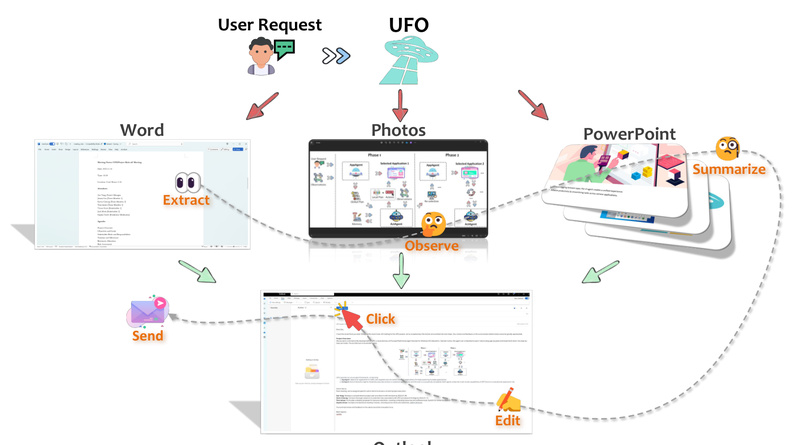
Imagine telling your computer what you want it to do—like “Summarize this PDF, email the summary to my manager, and save a copy to OneDrive”—and watching it execute the entire sequence across multiple applications without you lifting a finger. That’s the promise of UFO, a groundbreaking desktop AI agent purpose-built for Windows. Developed by Microsoft and open-sourced on GitHub, UFO is the first agent explicitly designed to understand, navigate, and interact with the full breadth of Windows applications using nothing but natural language.
Unlike traditional macro tools or scripted automations that break with UI updates, UFO leverages a vision-language model (like GPT-4o) combined with deep Windows OS integration to observe, reason about, and act on graphical interfaces—accurately and reliably. Whether you’re a researcher, developer, or power user drowning in repetitive cross-application tasks, UFO transforms your workflow from manual to magical.
What Makes UFO Different?
Deep OS Integration Meets AI Intelligence
UFO doesn’t just “see” your screen—it understands it at the system level. By fusing Windows UI Automation (UIA), Win32, and WinCOM APIs, UFO detects controls natively, even in custom or complex applications. This means buttons, menus, and text fields aren’t just pixels; they’re actionable elements with semantic meaning. When native APIs are available, UFO uses them for fast, robust execution. When they’re not—like in legacy or non-standard apps—it seamlessly falls back to precise clicks and keystrokes.
Hybrid Perception: Vision + Structure
UFO’s dual perception pipeline combines multimodal vision (via GPT-Vision) with structured UI metadata. This hybrid approach ensures reliability: vision helps interpret non-standard or visually distinct controls (e.g., custom-designed buttons), while UIA provides precise bounding boxes and states (enabled/disabled, selected, etc.). The result? Fewer hallucinations and more accurate action grounding—critical for real-world usability.
Speculative Execution Cuts LLM Costs by Over 50%
One of UFO’s most compelling innovations is its Speculative Multi-Action Executor. Instead of querying the LLM for every single click, UFO predicts a short sequence of likely actions (e.g., “open Excel → select cell A1 → copy → switch to Outlook → paste into new email”) and validates them against the live UI state in one go. This technique reduces LLM calls by up to 51%, making automation not only faster but significantly more cost-effective.
AgentOS Architecture for Complex, Cross-App Tasks
With UFO2, Microsoft introduced the Desktop AgentOS concept—a multi-agent framework where:
- The HostAgent interprets your high-level goal, launches required apps, and coordinates the workflow.
- Each AppAgent runs a ReAct-style reasoning loop within its application, using retrieval-augmented knowledge (from docs, past runs, or Bing) to make informed decisions.
- A shared Knowledge Substrate continuously learns from demonstrations, documentation, and execution traces, enabling the system to improve over time.
This architecture allows UFO to handle tasks that span File Explorer, Excel, Outlook, Edge, VS Code, and more—something most GUI automation tools simply can’t do.
Real Pain Points UFO Solves
For professionals, daily work often involves stitching together actions across siloed applications:
- Data analysts manually copy charts from Excel into PowerPoint, then email the deck.
- Developers switch between VS Code, terminal, and browser to test, commit, and document changes.
- Administrative staff extract info from web forms, paste into Word templates, and file them in network drives.
These workflows are tedious, error-prone, and time-consuming. UFO eliminates them by turning natural language requests into fully automated, multi-step procedures—no scripting, no recording, no fragile XPath selectors.
Getting Started in Under 5 Minutes
UFO is designed for quick adoption:
- Install: Requires Windows 10+ and Python 3.10+. Clone the repo and run
pip install -r requirements.txt. - Configure: Provide your LLM API key (supports OpenAI or Azure OpenAI with GPT-4o) in
config.yaml. EnableVISUAL_MODE: Truefor vision capabilities. - Optional RAG: Boost performance by connecting UFO to offline help docs, Bing search, or your own demonstration logs.
- Run: Launch via CLI with
python -m ufo --task "my_task" -r "Summarize this report and email it".
Execution logs, screenshots, and traces are saved locally for review or replay—ideal for debugging or sharing workflows.
Ideal Use Cases—and Current Limits
Where UFO Excels:
- Cross-application Windows workflows involving standard or custom UIs.
- Tasks requiring perception + action, like reading data from a chart and inputting it elsewhere.
- Users with access to vision-capable LLMs (GPT-4o, Qwen-VL, etc.).
Limitations to Note:
- Windows-only: No macOS or Linux support.
- Requires internet access for LLM APIs (unless you deploy a local VLM).
- Not suited for purely command-line or API-only tasks with no GUI component.
Why UFO Represents the Future of Desktop Automation
UFO isn’t just another RPA tool. It’s a step toward AgentOS—an operating system where AI agents act as intelligent co-pilots, understanding context, learning from experience, and executing complex intents across your digital workspace.
Backed by rigorous benchmarks like Windows Agent Arena (154 real tasks) and OSWorld (49 cross-app scenarios), UFO is both research-grounded and production-ready for early adopters. Its open-source nature invites community contributions, while Microsoft’s active development (UFO2 released in April 2025) signals long-term commitment.
For teams evaluating next-gen automation, UFO offers a rare combination: deep Windows integration, multimodal reasoning, and zero-touch execution—all driven by natural language.
Summary
UFO redefines what’s possible for desktop automation on Windows. By combining vision-language models with native OS control APIs, it delivers reliable, cross-application task execution from simple English prompts. With features like speculative action batching, hybrid perception, and a modular AgentOS architecture, UFO stands out as a practical, scalable solution for real-world workflows. If you’re tired of manual, fragmented app interactions—and have access to a capable LLM—UFO is worth exploring today.