In today’s fast-paced digital landscape, automating browser-based workflows—from filling forms to comparing products—has become essential for both individuals and enterprises. Yet most existing tools either rely on brittle, rule-based scripts or generic large language model (LLM) agents that hallucinate, fail unpredictably, or generate unsafe code. Enter Agent-E: an open-source, research-backed AI agent specifically engineered for accurate, safe, and practical web automation.
Unlike experimental prototypes, Agent-E is built on real-world testing (including the WebVoyager benchmark, where it outperforms prior state-of-the-art agents by 10–30%) and grounded in foundational design principles derived from extensive development experience. It doesn’t just “try” to automate the web—it does so with structure, reliability, and intentionality, making it a compelling choice for engineers, product teams, and technical decision-makers seeking robust browser automation.
Why Agent-E Stands Out: Architecture Built for Real Web Complexity
At its core, Agent-E addresses a critical gap: the chaotic, ever-changing nature of live websites. Generic agents often struggle because they treat the entire HTML DOM as input—flooding the LLM with noise, irrelevant elements, and inconsistent identifiers. Agent-E solves this through a combination of architectural innovations and domain-aware engineering.
Hierarchical Planning with Specialized Agents
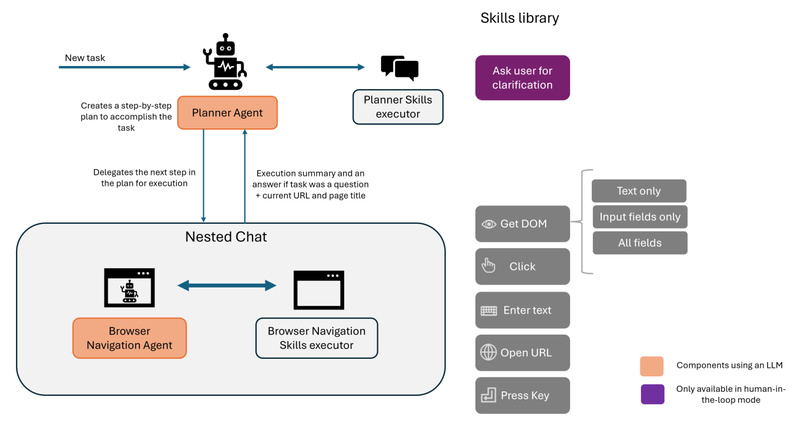
Agent-E adopts a hierarchical agent architecture built on the AG2 (formerly AutoGen) framework. Rather than relying on a single monolithic agent, it separates concerns: a high-level planner agent breaks down user goals into subtasks, while a dedicated browser navigation agent executes atomic actions. This enables complex, multi-step reasoning—such as “find the cheapest business-class flight from Lisbon to Singapore on September 15″—without overwhelming the LLM with low-level details upfront.
DOM Distillation and Denoising via the Accessibility Tree
One of Agent-E’s most impactful features is its DOM distillation mechanism. Instead of parsing raw HTML, Agent-E leverages the browser’s Accessibility Tree—a streamlined representation designed for screen readers—which naturally filters out decorative or non-interactive elements. It then distills this into three practical content types:
- Text-only: For pure information extraction (e.g., pulling sports scores from ESPN).
- Input fields: For identifying actionable elements like buttons, inputs, and dropdowns.
- All fields: When comprehensive context is needed.
To ensure stable element referencing—even on sites lacking proper IDs—Agent-E injects a unique mmid attribute into every DOM node. The LLM is guided to use these stable identifiers, drastically improving click accuracy and reducing flakiness.
Change Observation for Reliable State Tracking
Web pages change dynamically after interactions (e.g., after submitting a form or clicking “Load More”). Agent-E introduces change observation, a technique that helps the agent detect and respond to DOM mutations. This allows it to confirm whether an action succeeded (e.g., “Did the product actually get added to the cart?”) and adjust its next steps accordingly—reducing errors caused by blind execution.
Safe, Predefined Skills Instead of Arbitrary Code
Crucially, Agent-E does not allow the LLM to generate raw code. Instead, it exposes a library of well-defined, conversational skills—atomic actions like click, enter_text, openurl, and get_dom_with_content_type. Each skill returns a natural language description of its outcome, enabling the agent to self-correct without risking malicious or malformed JavaScript execution. This design prioritizes safety and predictability over unbounded flexibility.
Practical Use Cases Where Agent-E Delivers Immediate Value
Agent-E excels at tasks that require multi-step reasoning across live, dynamic websites. Here are real-world scenarios where it shines:
- E-commerce Automation: “Find iPhone 14 on Amazon and sort by best seller,” then extract pricing or add to cart.
- Form Filling with Context: Populate a web form using data from another site or user preferences (e.g., auto-filling a job application with LinkedIn info).
- Information Aggregation: “Go to ESPN, find the latest soccer champions, and summarize the results.”
- Workflow Management: Filter JIRA issues by status or assignee and report progress.
- Media Interaction: “Open YouTube, search for Oppenheimer by Veritasium, and play the video in full screen.”
- Personal Shopping Assistance: Recommend storage solutions for game cards based on user-specified needs.
What ties these together is context-aware navigation—Agent-E doesn’t just click buttons; it understands the purpose of each step and adapts when pages behave unexpectedly.
Getting Started: Simple Setup with Flexible Integration
Agent-E is designed for quick adoption without sacrificing configurability.
Quick Installation
The project provides platform-specific install scripts:
- On macOS/Linux:
./install.sh -p(the-pflag auto-installs Playwright) - On Windows:
.win_install.ps1 -p
This automatically sets up a Python 3.11+ virtual environment using uv and installs dependencies.
Configuration
Users configure Agent-E via a .env file, specifying:
AUTOGEN_MODEL_NAME(e.g.,gpt-4-turbofor best results)AUTOGEN_MODEL_API_KEY- Optional settings like Chrome profile path (
BROWSER_STORAGE_DIR) or custom skill directories
Usage Modes
- Interactive CLI: Run
python -m ae.mainto launch a chat interface in the browser for natural language commands. - Programmatic API: Start the FastAPI server (
uvicorn ae.server.api_routes:app --loop asyncio) and send POST requests to/execute_taskfor integration into larger systems.
Local open-source models (e.g., Mistral via Ollama + LiteLLM) are supported, though the team notes this path is less thoroughly validated than cloud-based LLMs.
Current Limitations to Consider
While powerful, Agent-E is purpose-built—and that comes with boundaries:
- Browser-Only Scope: It automates only web browsers, not desktop applications.
- No PDF Form Support: Handles HTML web forms, but not PDF-based ones.
- Single-Tab Operation: Cannot maintain state across multiple tabs; opening a new tab resets context.
- Live Site Dependency: Performance may vary if target websites change structure (a universal challenge for web automation).
- Experimental Local LLM Support: Open-source models work in theory but haven’t been rigorously benchmarked.
These constraints ensure focus and reliability—Agent-E avoids overpromising on capabilities it can’t consistently deliver.
Summary
Agent-E isn’t just another web automation experiment. It’s a practical, benchmark-proven system built on research-backed principles: hierarchical planning, observation distillation, safe skill primitives, and change-aware execution. By prioritizing accuracy over generality, it delivers a rare combination of flexibility and reliability for real-world browser tasks.
For technical teams evaluating agentic automation tools, Agent-E offers a compelling proposition: an open-source foundation that’s both easy to start with and engineered for production-like robustness. If your project involves automating complex, multi-step interactions on live websites—without resorting to fragile scripts or unsafe code generation—Agent-E deserves serious consideration.