If you’re working with text-to-image models like Stable Diffusion, you’ve likely faced the trade-off between customization and efficiency. Full fine-tuning is costly and slow, while basic adapters like LoRA sometimes fall short in fidelity or flexibility. Enter LyCORIS—an open-source library presented at ICLR 2024 that brings a suite of advanced, parameter-efficient fine-tuning methods to Stable Diffusion.
LyCORIS (short for Lora beYond Conventional methods, Other Rank adaptation Implementations for Stable diffusion) lets you adapt models to new styles, characters, or products with minimal compute, storage, and training time—without modifying the entire base model. Whether you’re a developer, researcher, or creative technologist, LyCORIS gives you more control, more choices, and better results in your generative AI workflows.
Why LyCORIS Solves Real Fine-Tuning Pain Points
Traditional fine-tuning of large diffusion models demands massive GPU memory, long training times, and risks overfitting or catastrophic forgetting. Even LoRA, while efficient, may not always deliver the desired balance between output quality, diversity, and model size.
LyCORIS addresses these issues by offering multiple low-rank adaptation algorithms under a unified framework. Instead of being locked into one method, you can select the best approach for your specific task—whether you prioritize compact model size, fast training, high fidelity, or the ability to mix multiple concepts. This flexibility is especially valuable when you need rapid iteration or deployment in resource-constrained environments.
A Toolkit of Proven Fine-Tuning Algorithms
LyCORIS currently implements several parameter-efficient methods, each with distinct strengths:
- LoRA (LoCon): The classic low-rank adaptation baseline.
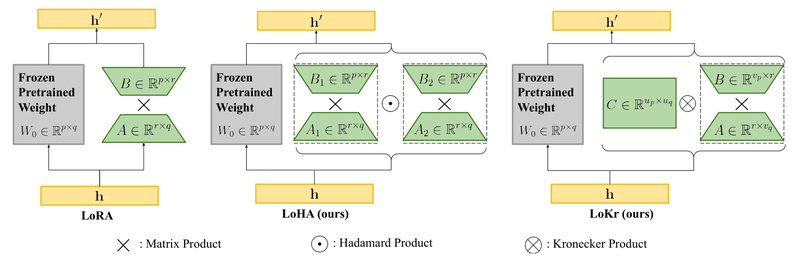
- LoHa: Uses Hadamard products for better representation capacity.
- LoKr: Leverages Kronecker decomposition to reduce parameters further while maintaining performance.
- (IA)³: A lightweight method that scales activations rather than weights.
- DyLoRA: Dynamically adjusts rank during training for adaptive complexity.
- Native fine-tuning (DreamBooth-style): For cases where full control is needed.
The project documentation includes a comparative overview (based on empirical testing) that evaluates these methods across dimensions like fidelity, diversity, flexibility, model size, and training speed. For example, LoKr with a high factor may yield higher fidelity but could reduce flexibility when combining multiple concepts or switching base models. This transparency helps you make informed decisions based on your priorities.
Note: Performance varies by dataset, prompt type, and hyperparameters—so experimentation is encouraged.
Seamless Integration with Your Existing Tools
One of LyCORIS’s biggest strengths is plug-and-play compatibility. If you’re already using popular Stable Diffusion interfaces, you’re in luck:
- AUTOMATIC1111’s WebUI (v1.5+) natively supports LyCORIS models. Just drop your
.safetensorsfile into themodels/Loraormodels/LyCORISfolder and use the standard<lora:filename:multiplier>syntax. - ComfyUI, InvokeAI, CivitAI, and Tensor.Art also support LyCORIS models, though newer algorithm types may require updates from those platforms’ maintainers.
This compatibility means you can train a LyCORIS adapter today and deploy it immediately in your preferred generation environment—no custom loaders or format conversions needed (in most cases).
Practical Workflow: From Training to Generation
Using LyCORIS follows a straightforward pipeline:
-
Install:
pip install lycoris-lora
Or install from source for the latest features.
-
Train: Choose your preferred method:
- Via Kohya’s training scripts with
--network_module lycoris.kohyaand algorithm-specific args (e.g.,algo=loha). - Using your own PyTorch code by wrapping any model with
create_lycoris()—ideal for non-diffusion models or research experiments. - Through community GUIs like bmaltais/kohya_ss or Colab notebooks (support varies by version).
- Via Kohya’s training scripts with
-
Use: In WebUI or ComfyUI, simply reference your LyCORIS file like any LoRA.
-
Optional Utilities:
- Merge a LyCORIS adapter back into a base checkpoint for distribution.
- Extract LoCon weights from a DreamBooth model.
- Convert between HCP-Diffusion and WebUI formats if needed.
This end-to-end workflow lowers the barrier to adopting advanced fine-tuning techniques—even for teams without deep infrastructure expertise.
Real-World Scenarios Where LyCORIS Adds Value
LyCORIS shines in use cases that demand customization without overhead:
- Brand-specific imagery: Train a compact adapter to generate product shots consistent with your visual identity.
- Character or style consistency: Create a personalized artist style or character that appears reliably across prompts.
- Concept combination: Mix multiple trained concepts (e.g., “cyberpunk cat wearing sunglasses”) without retraining from scratch—though caution is advised with high-factor LoKr or similar methods.
- Rapid prototyping: Iterate on visual assets for games, marketing, or research in hours, not days.
Because LyCORIS models are small (often just a few MBs), they’re easy to store, version, and share—making them ideal for collaborative or production pipelines.
Key Limitations and Considerations
While powerful, LyCORIS isn’t a silver bullet:
- Algorithm trade-offs: High-factor LoKr may improve fidelity but reduce flexibility when switching base models or combining adapters.
- Tooling lag: Not all UIs immediately support every new algorithm—check compatibility or request updates from maintainers.
- Hyperparameter sensitivity: Results depend heavily on dataset quality, learning rate, rank dimensions, and prompt diversity. The included evaluation framework (from the paper) can help you systematically test configurations.
The project actively evolves, with GLoRA and GLoKr on the roadmap—suggesting continued innovation beyond current capabilities.
Summary
LyCORIS empowers you to fine-tune Stable Diffusion models efficiently, flexibly, and effectively. By offering multiple state-of-the-art parameter-efficient methods in one open-source package—and integrating smoothly with existing tools—it removes major barriers to customization in text-to-image generation. Whether you’re building a commercial application, running academic experiments, or exploring creative AI, LyCORIS gives you the tools to adapt models faster, smaller, and smarter—without retraining everything from scratch.
For developers and technical decision-makers, this means faster iteration, lower costs, and greater control over generative outputs. If your project involves custom image synthesis, LyCORIS is worth evaluating as a core part of your fine-tuning strategy.