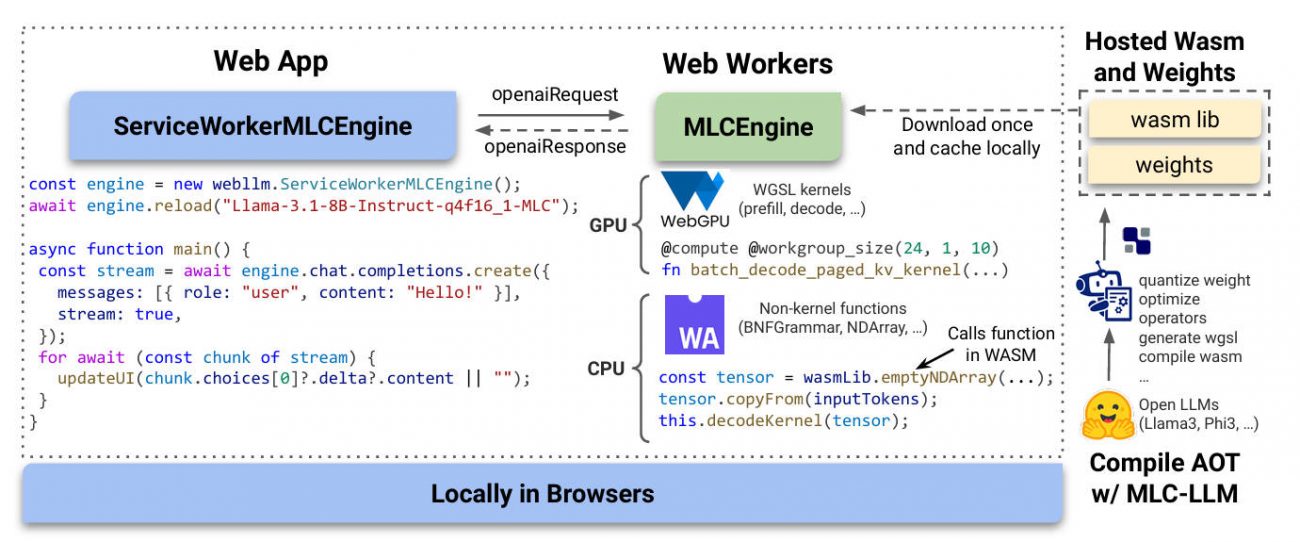
Imagine running powerful large language models (LLMs)—like Llama 3, Mistral, or Phi 3—directly inside a user’s web browser, with no backend servers, no cloud dependencies, and zero data ever leaving the device. That’s exactly what WebLLM delivers: a high-performance, open-source JavaScript framework for in-browser LLM inference that leverages modern web standards like WebGPU and WebAssembly to bring AI experiences to users with uncompromising privacy and universal accessibility.
Unlike traditional LLM deployments that rely on expensive GPUs or cloud APIs, WebLLM shifts computation to the client. This means developers can build AI-powered applications that work offline, protect sensitive user inputs (e.g., in healthcare or finance), and run instantly on any modern browser—no installation, no sign-up, no data leakage. And because it mirrors the OpenAI API, integrating WebLLM into existing projects often requires just a few lines of code.
Why In-Browser LLM Inference Matters
For years, LLMs have been locked behind server infrastructures, creating bottlenecks around cost, latency, and data privacy. WebLLM breaks this pattern by enabling local, on-device inference in the most universal runtime environment we have: the web browser.
This isn’t just about convenience—it’s about sovereignty. User data stays on-device. There’s no need to transmit prompts to third-party servers. Compliance with GDPR, HIPAA, or internal data policies becomes dramatically simpler. Plus, applications remain functional even without internet connectivity, opening doors for use in remote, secure, or resource-constrained environments.
Core Capabilities That Set WebLLM Apart
Full OpenAI API Compatibility
WebLLM implements the same interface developers already know from OpenAI’s API. Functions like chat.completions.create() work identically—supporting streaming responses, JSON mode, reproducible outputs via seeding, and even preliminary function calling. If you’ve built a chat interface for OpenAI, you can switch to WebLLM with minimal refactoring.
Hardware-Accelerated Performance
Powered by WebGPU, WebLLM taps into the user’s local GPU for inference acceleration. On capable devices, it achieves up to 80% of native performance—a remarkable feat for a browser-based system. For devices without WebGPU support, it falls back gracefully to highly optimized WebAssembly code for CPU execution.
Broad Model Support Out of the Box
WebLLM natively supports quantized versions of popular open-source models, including:
- Llama 3 and Llama 2
- Phi 3, Phi 2, and Phi 1.5
- Mistral 7B variants
- Gemma-2B
- Qwen 2 (0.5B, 1.5B, 7B)
These models are precompiled in the MLC format, optimized for web deployment with quantization (e.g., q4f32_1) to reduce download size and memory footprint.
Plug-and-Play Integration
You can start using WebLLM in seconds:
- Install via npm:
npm install @mlc-ai/web-llm - Or import directly from a CDN:
import * as webllm from "https://esm.run/@mlc-ai/web-llm";
There’s no complex setup—just load a model and call the familiar chat API.
Real-World Applications
WebLLM shines in scenarios where privacy, offline access, or zero-infrastructure deployment matter:
- Privacy-first AI assistants: Handle sensitive queries (e.g., medical or financial advice) without sending data to external servers.
- Offline-capable educational tools: Language tutors or coding assistants that work on airplanes or in remote areas.
- Chrome extensions with local LLMs: Augment browsing with AI that reasons over page content without phoning home.
- Rapid prototyping on CodePen or JSFiddle: Build and demo LLM apps instantly—no backend, no deployment pipeline.
- Enterprise internal tools: Deploy secure, auditable AI features without exposing data to cloud APIs.
Getting Started in Under Five Minutes
Here’s how simple it is to run your first LLM in the browser:
import { CreateMLCEngine } from "@mlc-ai/web-llm";

const engine = await CreateMLCEngine("Llama-3.1-8B-Instruct-q4f32_1-MLC");

const messages = [
  { role: "system", content: "You are a helpful assistant." },
  { role: "user", content: "Explain WebLLM in one sentence." }
];

const response = await engine.chat.completions.create({ messages });
console.log(response.choices[0].message.content);
Want streaming? Just add stream: true. Need structured JSON output? Enable response_format: { type: "json_object" }.
Advanced Features for Production Use
WebLLM isn’t just for demos—it’s built for real applications.
Web Workers & Service Workers
To keep your UI responsive, offload inference to a Dedicated Web Worker. For persistent models across page reloads or offline sessions, use a Service Worker—WebLLM includes ready-made handlers and engine interfaces for both.
Custom Model Support
If you’ve fine-tuned a model or have proprietary weights, WebLLM supports custom models compiled via MLC LLM. You provide the model weights (hosted anywhere) and a compatible WebAssembly library, and WebLLM handles the rest.
Important Considerations
While WebLLM is powerful, it’s essential to understand its current boundaries:
- Initial model download can be large (200–500 MB for 7B-class models), though browser caching mitigates repeat loads.
- WebGPU support is required for best performance (available in Chrome 113+, Edge, and upcoming Firefox).
- Not all OpenAI features are complete—function calling is marked “WIP,” and models must be precompiled in MLC format (you can’t drop in arbitrary Hugging Face checkpoints).
- Performance scales with device capability: high-end laptops deliver near-native speeds; low-end phones may experience slower generation.
Summary
WebLLM redefines what’s possible with browser-based AI. By bringing full LLM inference to the client—securely, privately, and with OpenAI-compatible APIs—it empowers developers to build next-generation applications that respect user autonomy and eliminate infrastructure overhead. Whether you’re prototyping a chatbot, building a confidential assistant, or creating an offline educational tool, WebLLM offers a compelling path forward: AI that runs where your users are—inside their browser, under their control.