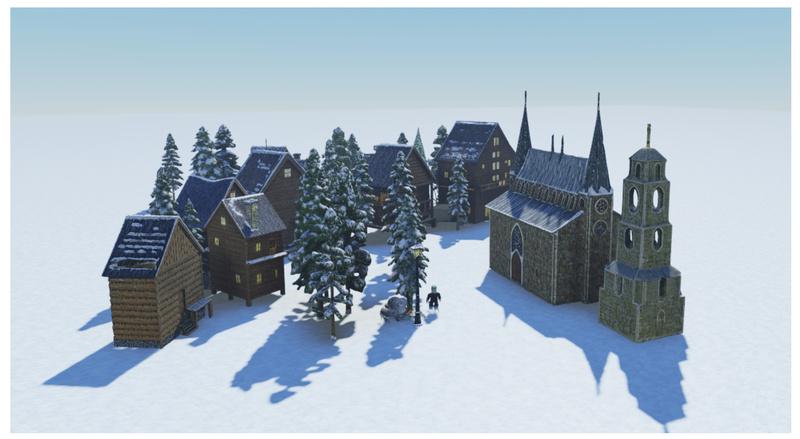
Imagine describing a “mechanical lobster with tank treads” in plain English and instantly getting a usable 3D model—no Blender expertise, no sculpting, no UV mapping. That’s the promise of Cube, Roblox’s open-source generative AI system for 3D intelligence. Designed specifically for creators, developers, and researchers who need to prototype or produce 3D content fast, Cube lowers the barrier to entry for 3D creation by turning natural language into geometric shapes.
Unlike traditional 3D pipelines that demand deep technical knowledge and hours of manual work, Cube is built for real-world creative workflows. Whether you’re an indie game developer racing to test a concept, an educator building interactive learning tools, or a researcher exploring embodied AI, Cube offers a practical, accessible starting point for integrating generative 3D into your projects—today.
Why Cube Matters for Creators and Builders
3D content creation has long been a bottleneck in game development, simulation design, and immersive experiences. The learning curve for modeling software is steep, and asset pipelines are often slow and resource-intensive. Cube directly addresses this pain point by enabling text-to-3D generation that respects both semantic detail and spatial constraints.
Developed by Roblox’s Foundation AI Team, Cube isn’t just a research demo—it’s a production-oriented toolkit with open weights, a clean API, and support for integration into existing developer ecosystems. Its vision is ambitious: a unified foundation model for 3D intelligence that can eventually handle objects, scenes, rigging, and even scriptable behaviors. But even in its current form (v0.5 as of mid-2025), it delivers tangible value for rapid ideation and lightweight asset generation.
Key Capabilities That Set Cube Apart
Faithful Text-to-Shape Generation
Cube excels at interpreting complex, compositional prompts. Examples like “lowpoly paper craft Victorian rabbit” or “broad-winged flying red dragon with folded legs” demonstrate its ability to blend multiple attributes into a single coherent 3D shape. This isn’t random shape synthesis—it’s concept-aware generation with strong adherence to the input description.
Bounding Box Conditioning for Proportional Control
One of Cube’s standout features in v0.5 is bounding box conditioning. You can specify the desired aspect ratio (e.g., --bounding-box-xyz 1.0 2.0 1.5) to guide the model’s output geometry. This is invaluable when you need a “tall pagoda” to actually be tall, or a “wide sofa” to fit a specific spatial layout. The model intelligently balances textual semantics and geometric constraints—though it may struggle with extreme mismatches (e.g., forcing a “cat” into a needle-thin box).
Seamless Integration with Existing AI Stacks
Cube is designed to work alongside large language models (LLMs). Generated 3D scenes can be fed into LLMs for reasoning tasks—such as inferring object relationships, generating behavior scripts, or answering spatial queries. This interoperability makes Cube a natural fit for multimodal AI systems, robotics simulators, or intelligent game design assistants.
Open, Developer-Friendly Tooling
The project ships with:
- Pre-trained model weights on Hugging Face
- A minimal CLI for one-command generation
- A clean Python API (
Engine/EngineFast) for programmatic use - Support for turntable rendering via Blender (v4.3+)
You can go from clone to .obj file in under five minutes—assuming you have the hardware.
Practical Use Cases for Teams and Individuals
Cube shines in scenarios where speed, iteration, and accessibility outweigh the need for photorealistic fidelity. Consider these real-world applications:
- Game Jam Prototyping: Generate dozens of placeholder assets from text during a 48-hour game jam.
- Indie Developer Workflows: Turn narrative descriptions (“rustic wooden treasure chest with iron clasp”) into base meshes for further refinement.
- Educational Tools: Let students explore 3D design by describing objects rather than wrestling with modeling software.
- AI Research: Use Cube as a 3D “imagination engine” for agents that need to reason about or interact with generated environments.
While Cube doesn’t yet support textures or full scene layouts (both listed as upcoming features), its current focus—high-quality, prompt-aligned geometry—is already sufficient for many prototyping and conceptualization tasks.
Getting Started: From Zero to 3D in Minutes
Running Cube is straightforward if you meet the hardware requirements:
-
Install the package:
git clone https://github.com/Roblox/cube.git
cd cube
pip install -e .[meshlab]
-
Download model weights from Hugging Face:
huggingface-cli download Roblox/cube3d-v0.5 --local-dir ./model_weights
-
Generate your first model:
python -m cube3d.generate --gpt-ckpt-path model_weights/shape_gpt.safetensors --shape-ckpt-path model_weights/shape_tokenizer.safetensors --prompt "A futuristic coffee mug with neon glow" --bounding-box-xyz 1.0 1.2 1.0
The result is an .obj file in the outputs/ directory. Add --render-gif (with Blender installed) to auto-generate a turntable animation.
For programmatic control, the Python API lets you embed Cube into larger pipelines:
from cube3d.inference.engine import EngineFast
engine = EngineFast(config_path, gpt_ckpt, shape_ckpt, device="cuda")
mesh = engine.t2s(["A steampunk key"], resolution_base=8.0)[0]
Hardware and Limitations to Know
Cube is powerful but not magic. Be aware of these practical constraints:
- GPU Requirements: At least 16GB VRAM (24GB recommended for
--fast-inference). Tested on A100, H100, L40S, and Apple Silicon M2–M4. - macOS Limitations: Fast inference (
EngineFast) is CUDA-only—Mac users must use the standardEngine. - Geometry-Only Output: No textures, materials, or animations yet. Output is raw mesh geometry.
- Bounding Box Sensitivity: Extremely skewed boxes may yield fragmented or diagonal-aligned shapes.
- Quality vs. Speed Trade-off: Lower
resolution_basevalues (e.g., 4.0) speed up decoding but reduce mesh detail.
These limitations are clearly documented, and the team is actively iterating—v0.5 already shows marked improvements in fidelity and prompt alignment over v0.1.
Summary
Cube is a rare blend of research ambition and practical utility. By transforming text into 3D shapes with strong semantic grounding and geometric controllability, it empowers non-experts to participate in 3D creation and accelerates prototyping for professionals. While not a replacement for high-end asset production, it’s an exceptional tool for ideation, education, and AI-augmented development. With open weights, a clean API, and active development from Roblox, Cube is well-positioned to become a go-to solution for anyone looking to bring language-driven 3D generation into their workflow.
If your project involves rapid 3D asset generation, spatial reasoning, or multimodal AI—and you have access to a capable GPU—Cube is worth experimenting with today.