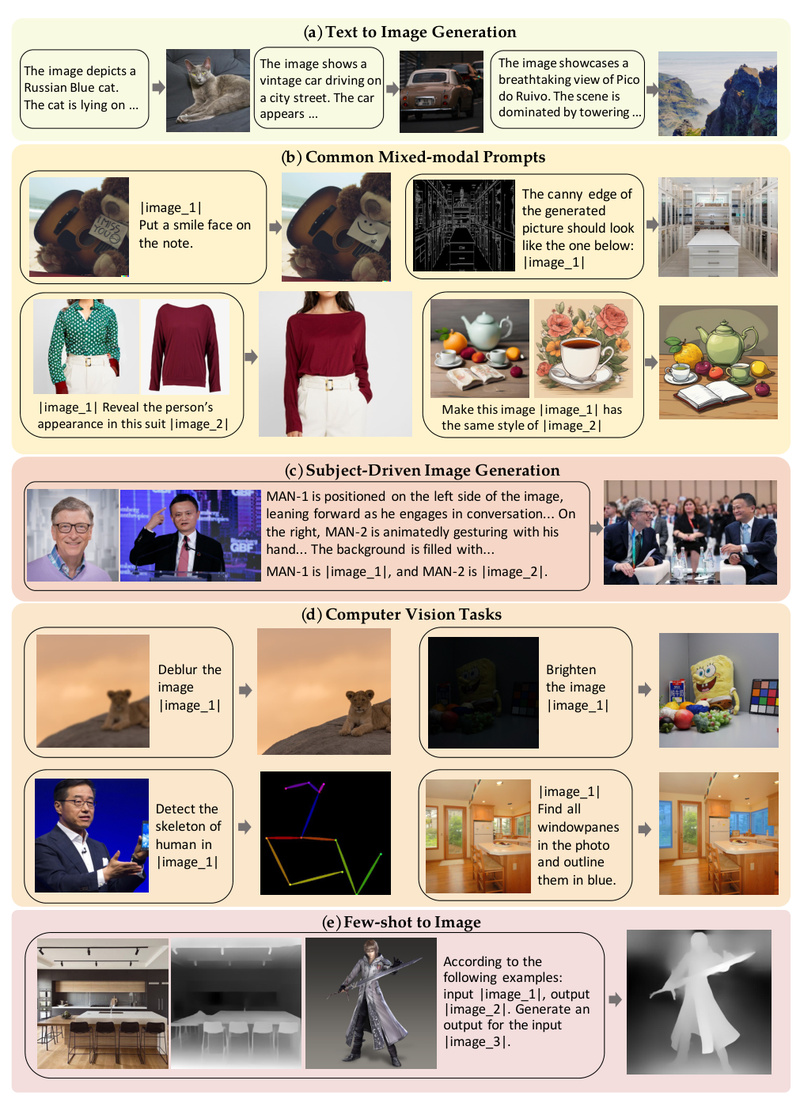
Modern image generation is powerful—but fragmented. Depending on your goal—generating from text, editing existing images, preserving a person’s identity, or combining visual references—you typically need different models, extra plugins like ControlNet or IP-Adapter, and manual preprocessing steps like pose estimation, face alignment, or image cropping. This complexity slows down workflows, increases engineering overhead, and creates a steep learning curve for non-experts.
OmniGen changes this. Introduced in the paper OmniGen: Unified Image Generation, it’s the first diffusion-based model designed from the ground up to handle all major image generation tasks within a single, plug-in-free architecture. Inspired by the unification trend in language models like GPT, OmniGen treats image generation as a general-purpose instruction-following problem: you describe what you want—using text, images, or a mix—and OmniGen produces the result end-to-end, without intermediate steps or external modules.
Whether you’re a product designer rapidly iterating concepts, a researcher exploring multi-modal reasoning, or a developer building a creative AI tool, OmniGen offers a radically simpler alternative to today’s patchwork of specialized systems.
Why OmniGen Solves Real Workflow Pain Points
Traditional image generation pipelines suffer from three recurring issues:
- Plugin sprawl: To control pose, depth, or style, you must load separate networks (e.g., ControlNet for edges, ReferenceNet for style, IP-Adapter for identity).
- Preprocessing bottlenecks: Tasks like subject-driven generation often require manual steps—cropping faces, masking regions, estimating skeletons—before the model even runs.
- Task silos: A model fine-tuned for inpainting rarely works for text-to-image, forcing teams to maintain and deploy multiple models.
OmniGen eliminates these. It natively understands multi-modal instructions—including natural language and image placeholders—and automatically infers which visual elements to preserve, modify, or generate. No cropping. No pose detectors. No switching models. Just one unified system.
Key Features That Make OmniGen Unique
1. True Task Unification
OmniGen supports a wide range of capabilities out of the box:
- Text-to-image generation (e.g., “A red panda drinking coffee in Tokyo”)
- Subject-driven generation (e.g., “The dog in this photo wearing sunglasses”)
- Identity-preserving synthesis (e.g., generating new photos of a specific person while retaining their likeness)
- Image editing via natural language (e.g., “Change the background to a beach”)
- Visual-conditioned generation (e.g., using depth maps or sketches as implicit guides)
Critically, all these use the same model weights and interface. You don’t enable “editing mode” or load a “reference adapter”—the model interprets your prompt and input images contextually.
2. Extreme Simplicity in Design and Use
Unlike most diffusion systems, OmniGen requires no external plugins. Its architecture is streamlined to process arbitrary combinations of text and images directly. This not only reduces code complexity but also makes deployment easier and inference faster.
For example, to generate an image of “the man on the right in this photo reading a book,” you simply provide the photo and that exact sentence. OmniGen parses the reference, identifies the correct person, and composes the new scene—no manual bounding boxes or face embeddings needed.
3. Cross-Task Knowledge Transfer
Because OmniGen is trained on diverse tasks in a unified format, it learns to generalize across domains. This enables emergent capabilities on unseen combinations—like using a sketch and a photo together, or editing an image based on a verbal description referencing another image. The model’s internal representations become more robust and transferable, leading to better performance even on tasks not explicitly seen during training.
Practical Use Cases Where OmniGen Excels
Rapid Prototyping for Designers & Creators
Product teams can iterate visual concepts in minutes, not hours. Want to see your logo on a T-shirt worn by a model in a specific pose? Just describe it and provide reference images—no need for Photoshop or 3D rendering.
Personalized Content at Scale
E-commerce or gaming applications can generate identity-consistent avatars or product photos using a single customer photo and plain-language requests (“Wearing a winter coat, smiling, in front of mountains”).
Multi-Image Reasoning Without Alignment
OmniGen supports prompts like: “Combine the dress from <img><|image_1|></img> with the pose from <img><|image_2|></img>.” It handles the alignment and composition automatically—no manual feature matching or warping.
Accessible Image Editing for Non-Experts
Instead of learning complex tools, users can edit images through conversation-like instructions (“Make the sky stormy and add lightning”). This lowers the barrier for content creators without technical backgrounds.
Getting Started: Simple, Flexible, and Developer-Friendly
OmniGen is easy to install and run, whether you prefer local execution or cloud notebooks.
Installation
git clone https://github.com/VectorSpaceLab/OmniGen.git
cd OmniGen
pip install -e .
Basic Usage
Text-to-image:
from OmniGen import OmniGenPipeline
pipe = OmniGenPipeline.from_pretrained("Shitao/OmniGen-v1")
images = pipe(prompt="A futuristic city at sunset, neon lights", height=1024, width=1024)
images[0].save("city.png")
Multi-modal generation:
images = pipe(prompt="The cat in <img><|image_1|></img> sitting on a throne made of books.",input_images=["./cat.jpg"],height=1024,width=1024
)
OmniGen also integrates with Hugging Face Diffusers, supports Gradio demos for UI prototyping, and runs efficiently on consumer GPUs with options like offload_model=True to reduce memory usage.
For quick testing, a Google Colab notebook is available—just clone the repo and launch app.py.
Limitations and Realistic Expectations
While OmniGen represents a major step toward general-purpose image generation, it’s not a magic bullet:
- Hardware demands: Generating 1024×1024 images still requires a capable GPU (e.g., 16GB+ VRAM). Memory-efficient modes help but may reduce speed.
- Quality trade-offs: On highly specialized tasks (e.g., medical imaging or photorealistic portrait retouching), task-specific models may still outperform OmniGen.
- Early-stage model: As the first of its kind, OmniGen v1 has room for refinement. The team actively releases updates (OmniGen2 is already available) and welcomes community feedback.
That said, for most creative, design, and prototyping applications, OmniGen’s flexibility and simplicity outweigh these constraints—especially when engineering speed and user accessibility are priorities.
Extending OmniGen for Custom Applications
One of OmniGen’s biggest advantages is its adaptability. You can fine-tune it on your own data without redesigning the architecture.
The codebase includes scripts for both full fine-tuning and LoRA-based adaptation, making it feasible to specialize OmniGen for:
- Brand-specific visual styles
- Internal product catalogs
- Domain-specific imagery (e.g., architecture, fashion, scientific visualization)
Just prepare your image-text pairs in a JSONL format and run the training script. No need to build custom control modules—OmniGen learns the mapping directly from your data.
Summary
OmniGen isn’t just another text-to-image model. It’s a paradigm shift—moving image generation from a fragmented ecosystem of task-specific tools toward a unified, instruction-driven interface akin to large language models. By eliminating plugins, preprocessing, and model switching, it dramatically simplifies workflows while expanding creative possibilities.
For project leads, technical decision-makers, and AI practitioners looking to integrate versatile, future-proof image generation into their stack, OmniGen offers a compelling blend of power, simplicity, and extensibility. With open-source code, Hugging Face integration, and active development, it’s ready for real-world adoption today.