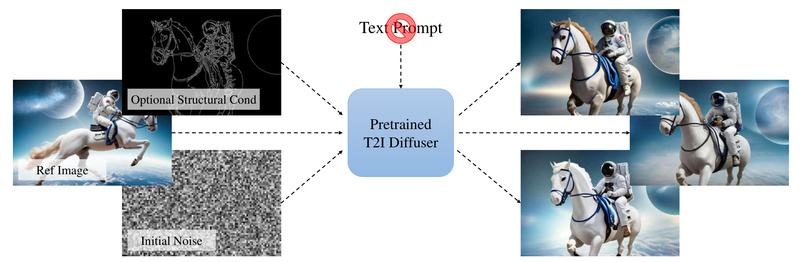
Text-to-image (T2I) diffusion models have revolutionized creative workflows—but they come with a hidden bottleneck: prompt engineering. Describing an image in words is often ambiguous, time-consuming, and creatively limiting. What if you could skip text entirely and let visuals do the talking?
Prompt-Free Diffusion offers exactly that. This innovative framework eliminates the need for text prompts by leveraging only visual inputs—a reference image as context, optional structural conditioning (like pose or depth maps), and initial noise—to generate high-quality, customized images. Developed by researchers at SHI Labs, it swaps out traditional text encoders (like CLIP) with a Semantic Context Encoder (SeeCoder) that interprets visual semantics directly from images.
The result? A more intuitive, less frustrating, and highly controllable image generation process that aligns closely with users’ visual intent—no "prompt sculpting" required.
How It Works: Replacing Text with Visual Context
At the heart of Prompt-Free Diffusion is SeeCoder, a drop-in replacement for the text encoder in standard diffusion pipelines. Instead of encoding a sentence like “a cyberpunk cat wearing neon goggles,” SeeCoder encodes the semantic content of a reference image—capturing style, composition, object relationships, and textures—without a single word.
This shift isn’t just conceptual; it’s practical. SeeCoder is designed to be model-agnostic and adapter-compatible. You can plug it into widely used T2I models (e.g., Stable Diffusion v1.5, RealisticVision, Anything v4) and combine it with ControlNet, LoRA, or T2I-Adapter to add precise structural guidance—again, all without writing prompts.
For example:
- Provide a photo of a dress → generate new outfits in the same style.
- Upload a rough sketch → produce a photorealistic rendering guided by edge maps.
- Use an anime character → create new poses or scenes while preserving identity.
The system treats the reference image as both inspiration and instruction, significantly reducing ambiguity inherent in natural language.
Standout Features for Practitioners
1. Truly Prompt-Free Workflow
No more iterating over dozens of prompts to get close to your vision. If you can show it, Prompt-Free Diffusion can (re)generate it.
2. Plug-and-Play Compatibility
SeeCoder integrates seamlessly with existing diffusion ecosystems. The GitHub repo includes pretrained SeeCoder checkpoints for general, photorealistic, and anime domains—and you can reuse a single SeeCoder across multiple base models.
3. Native Support for Visual Conditioning
It works out-of-the-box with ControlNet-style conditionings: Canny edges, depth, pose, segmentation, scribbles, and more. This enables fine-grained control over layout and structure while preserving the semantic essence of the reference.
4. User-Friendly Web UI
The included Gradio-based interface lets you upload a reference image, optionally add a control map, adjust generation parameters, and produce results in seconds—no coding required.
Ideal Use Cases
Prompt-Free Diffusion excels in scenarios where visual references are available but textual descriptions fall short:
- Style Transfer & Re-Rendering: Reproduce the aesthetic of a reference image on new content.
- Character Consistency: Generate new scenes with the same character (e.g., in anime or game assets) without redefining traits in text.
- Virtual Try-On: Adapt clothing or accessories from a reference onto new models or poses.
- Concept Iteration: Designers and artists can explore variations based on sketches or mood boards without linguistic bottlenecks.
- Accessibility: Lowers the barrier for non-native speakers or users unfamiliar with prompt-crafting conventions.
Critically, it doesn’t replace text-to-image models—it complements them by offering an alternative pathway when visuals are your primary input.
Getting Started in Minutes
Setting up is straightforward:
- Clone the repository and create a Conda environment with Python 3.10.
- Install PyTorch and dependencies via the provided
requirements.txt. - Download pretrained models (SeeCoder variants + base diffusion models + ControlNet weights) into the specified directory structure.
- Launch the WebUI with
python app.py.
Once running, you can:
- Upload a reference image.
- Optionally upload or generate a control map (e.g., pose from OpenPose, edges from HED).
- Click “Generate”—and get results without ever typing a prompt.
The project also includes utilities to convert models from popular formats (e.g., from AUTOMATIC1111’s WebUI), making migration easier for existing users.
Limitations and Practical Notes
While powerful, Prompt-Free Diffusion isn’t a universal solution:
- Reference-Dependent: Output quality heavily relies on the clarity, composition, and relevance of the input image. Poor references yield poor generations.
- Model Ecosystem Constraints: It’s designed as an inference-time enhancement, not a full training framework. You must use supported base models and SeeCoder checkpoints.
- Storage Requirements: The demo requires downloading multiple large model files (several GBs), which may be prohibitive on low-resource systems.
- No Text Hybridization: You cannot mix text and visual inputs—this is an intentional design choice to eliminate prompt engineering entirely.
That said, these trade-offs are justified by the core value proposition: removing linguistic friction from image creation.
Summary
Prompt-Free Diffusion reimagines the T2I pipeline by centering visual understanding over textual description. For project leads, researchers, and creators who struggle with inconsistent or labor-intensive prompt engineering, it offers a faster, more intuitive path to high-fidelity image generation. With drop-in compatibility, strong empirical results, and support for real-world applications like anime generation and virtual try-on, it’s a compelling addition to any visual AI toolkit. If your work starts with an image—not a sentence—this might be the tool you’ve been waiting for.