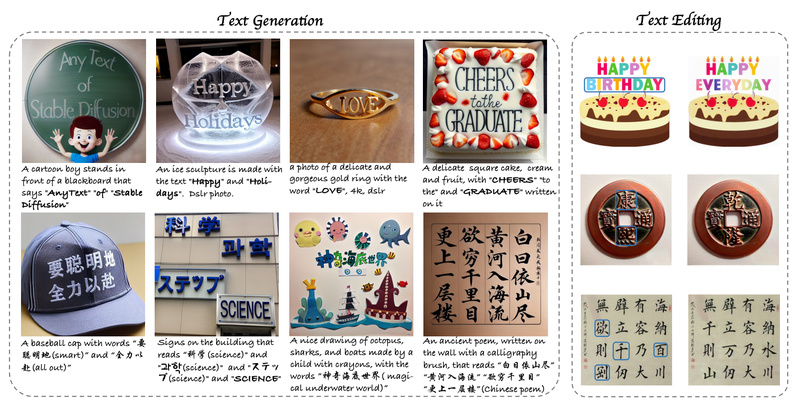
If you’ve ever tried using a standard AI image generator to create a poster, product mockup, or social media banner with specific text—like a brand slogan, street sign, or product label—you’ve likely been frustrated. Even the most advanced diffusion models often render text that’s blurry, misspelled, rotated, or entirely invented. This isn’t just a minor glitch; it’s a critical flaw for designers, marketers, developers, and researchers who rely on accurate visual communication.
Enter AnyText—a specialized, open-source solution designed to solve this exact problem. Unlike general-purpose text-to-image models, AnyText doesn’t aim to replace your favorite diffusion pipeline. Instead, it enhances it by adding precise, readable, and editable multilingual text directly into generated or existing images.
Built on top of Stable Diffusion 1.5, AnyText introduces two core innovations: an auxiliary latent module that processes glyph shapes, spatial positions, and masked regions, and a text embedding module that leverages OCR (optical character recognition) to encode stroke-level details. These components work together during diffusion to ensure the generated text aligns perfectly with both the semantic prompt and the visual context—whether you’re writing “Open 24/7” on a neon sign or “欢迎光临” on a storefront.
Best of all, AnyText is not just a research prototype. It’s production-ready, integrates with community models and LoRAs, supports real-world editing tasks, and comes with public demos, benchmarks, and a massive multilingual training dataset.
Why Standard Image Generators Fail at Text
Most text-to-image diffusion models treat text as just another semantic concept—not as a structured visual element that must obey strict glyph shapes, character spacing, and language rules. As a result:
- Words are often jumbled or hallucinated (e.g., “COFFEE” becomes “COFEEE” or “C0F3”).
- Text may appear upside-down, fragmented, or warped to fit artistic style at the cost of legibility.
- Multilingual support is inconsistent—models trained primarily on English data struggle with scripts like Chinese, Arabic, or Cyrillic.
- Editing existing text in an image (e.g., changing a date on a flyer) is nearly impossible without re-generating the entire scene.
These limitations make off-the-shelf models unreliable for professional or commercial use cases where textual accuracy is non-negotiable.
How AnyText Solves the Problem
AnyText tackles text rendering as a controlled generation and editing task, not a byproduct of image synthesis. Its architecture includes two key modules:
1. Auxiliary Latent Module
This component takes structured inputs—such as a text string, its target position (bounding box), and optionally a masked image region—and converts them into latent representations that guide the diffusion process. This ensures text appears exactly where you want it.
2. OCR-Guided Text Embedding Module
Instead of relying solely on caption embeddings from a CLIP tokenizer, AnyText uses a pre-trained OCR model to encode glyph stroke data into embeddings. These are then fused with standard prompt embeddings, enabling the model to “understand” what letters look like, not just what they mean.
During training, AnyText employs two specialized losses:
- Text-control diffusion loss: Aligns generated pixels with the intended glyph structure.
- Text perceptual loss: Preserves high-level visual fidelity and integration with background style.
This dual approach results in text that is not only correct but also visually harmonious with the surrounding image.
Standout Features for Real-World Use
AnyText goes beyond academic novelty with features designed for practical adoption:
- ✅ True multilingual support: Generates accurate text in English, Chinese, and other languages—reportedly the first diffusion-based method to do so systematically.
- ✅ Two operational modes: Use Text Generation to create new images with text, or Text Editing to modify text in existing images (e.g., update a menu item or change a slogan).
- ✅ Plug-and-play compatibility: Works with any Stable Diffusion 1.5–based model. You can even merge your own fine-tuned checkpoints or LoRA weights.
- ✅ Font and color control (AnyText2): The latest version lets you specify font style and text color for even greater customization.
- ✅ Open benchmarks and data: The team released AnyText-benchmark for standardized evaluation and AnyWord-3M, a 3-million-sample multilingual dataset with OCR annotations—enabling reproducibility and further innovation.
Practical Applications
AnyText shines in scenarios where textual accuracy = functional necessity:
- Marketing & Social Media: Create multilingual ad banners with correct brand names and calls-to-action.
- E-commerce: Generate product mockups with accurate labels, ingredients, or instructions.
- Design & Prototyping: Rapidly iterate UI mockups or signage with editable text layers.
- Content Creation: Build meme generators or sticker apps (as demonstrated by the project’s “MeMeMaster” demo).
- Research & Development: Benchmark visual text generation methods using a standardized, real-world dataset.
Getting Started—No PhD Required
You don’t need to train a model to use AnyText. Here’s how to get results fast:
- Try it online: Use the free demos on Hugging Face or ModelScope—no installation needed.
- Run locally: After cloning the repo and setting up the environment, a single command generates results:
python inference.py
- Customize: Load your preferred base model or LoRA, specify a font file (e.g., Arial Unicode MS), or switch to FP32 mode if needed.
- Edit text: In the local demo, provide an existing image with a mask and new text to perform targeted edits.
Note: You’ll need to provide your own font file due to licensing, and an NVIDIA GPU with ≥8GB VRAM is recommended for smooth FP16 inference.
Limitations to Keep in Mind
While powerful, AnyText has realistic boundaries:
- Font dependency: Requires a Unicode-capable font (like Arial Unicode MS), which users must supply.
- Architecture compatibility: Optimized for SD1.5; not yet natively compatible with SDXL or newer backbones.
- Hardware requirements: At least 8GB GPU memory for standard 512×512 generation.
- Tooling integration: Native support for stable-diffusion-webui is still pending (marked as a TODO).
- Language coverage: Performance depends on glyph and OCR data quality in the training set—less common scripts may see reduced accuracy.
Summary
If your work involves generating or modifying images where text must be accurate, legible, and multilingual, general-purpose AI image generators fall short. AnyText fills this gap with a focused, open-source, and community-friendly approach that plugs directly into existing workflows. Backed by rigorous benchmarks, a large-scale dataset, and real-world demos, it offers a significant leap in visual text fidelity—without requiring you to abandon your favorite diffusion models.
For designers, developers, marketers, and researchers tired of AI “almost getting the text right,” AnyText delivers the precision needed to move from prototype to production.